
Filtering Queries
Module overview
There are many ways that you can query a subset or subgraph of the data in the graph.
In this module, you will:
- Review basic query filtering.
- Evaluate strings in your query filtering.
- Retrieve data using patternsA graph structure written in Cypher, such as a node joined to another node by a relationship. in the graph.
- Learn how to specify multiple or optional
MATCHclauses.
Data model for this course
This course uses the movie dataset for all the queries you will be running and writing. This is the same dataset that will be used for the application development courses in GraphAcademy.
Here is the graph data modelThe labels, relationship types and properties chosen to represent a domain.:
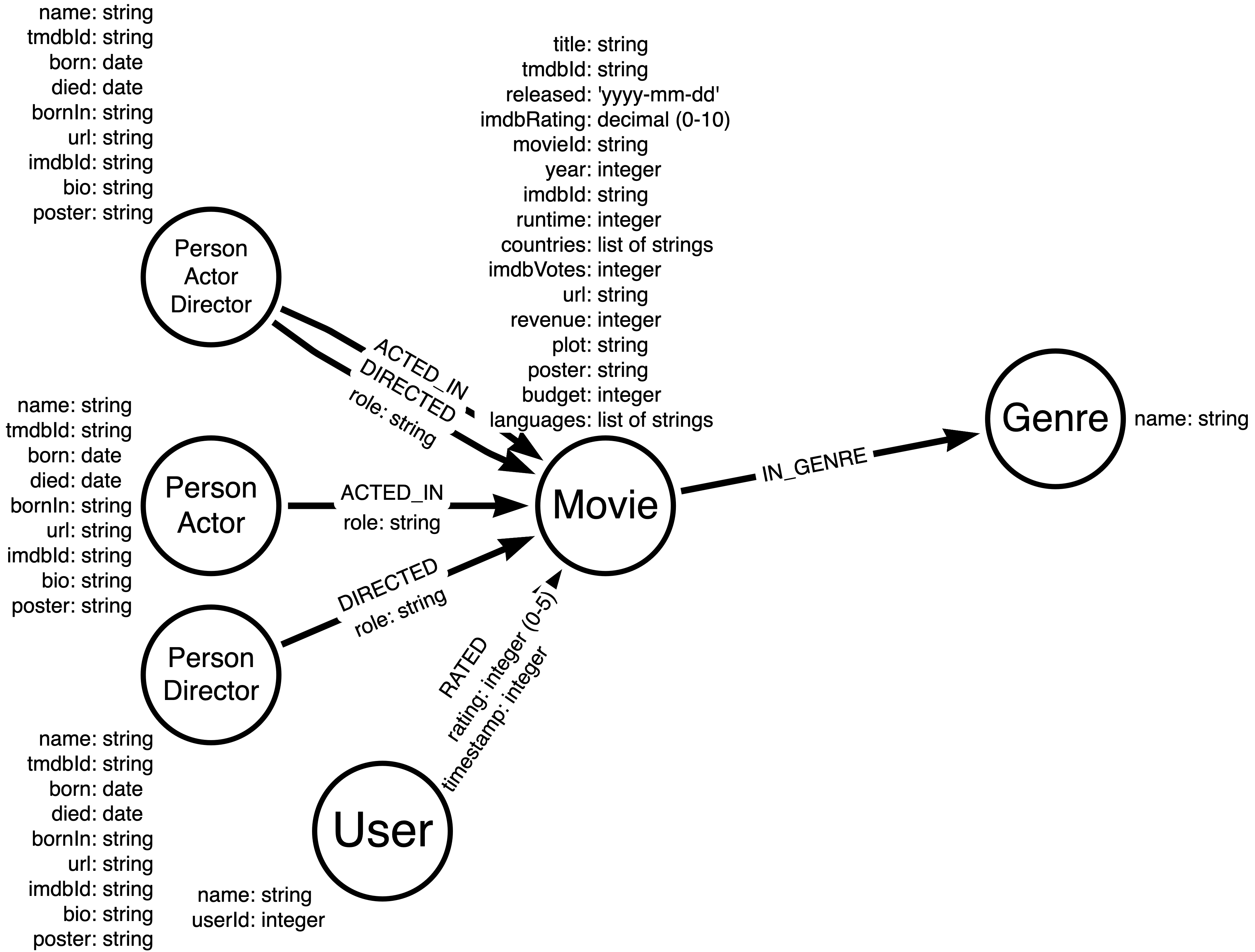
You can view the data model in the sandbox to the right by executing this query:
CALL db.schema.visualization()The nodeA vertex in a graph. In a property graph it can carry labels and properties. labelsA tag on a node that groups it with other nodes of the same kind. A node can carry more than one. for the graph include:
- Person
- Actor
- Director
- Movie
- Genre
- User
The relationshipsA named, directed connection between two nodes. Every relationship has a type, a start node and an end node. for the graph include:
- ACTED_IN (with an optional role propertyA named value stored on a node or a relationship.)
- DIRECTED (with an optional role property)
- RATED (with rating and timestamp properties)
- IN_GENRE
Also notice that the nodes have a number of properties, along with the type of data that will be used for each property. It is important that you understand the property types defined in the data model.
You can view the property types for nodes in the graph by executing this query:
CALL db.schema.nodeTypeProperties()You can view the property types for relationships in the graph by executing this query:
CALL db.schema.relTypeProperties()Each node with a given label has a property that uniquely identifies the node. These nodes are indexed in the graph.
- Movie nodes use movieId.
- Person nodes use tmdbId.
- User nodes use userId.
- Genre nodes use name.
You can view the uniqueness constraint indexes in the graph by executing this query:
SHOW CONSTRAINTSResources
During this course, you can refer to: