

Christopher Nolan's The Odyssey is stacked: Matt Damon, Anne Hathaway, Zendaya, Tom Holland. But Nolan is late to this party - Jorge Rivera-Herrans got there first with EPIC: The Musical. And behind them both stands Homer, who has waited 2,800 years for someone to ask: what does one story look like when three tellings of it live in a single graph database?
So I built one. 130 nodes, 235 relationships, one Neo4j Aura database. Who blinds whom? Who curses whom? And which two very different men have both played Odysseus?
Why a graph?
At its core, The Odyssey is a story about connections. Divine grudges, family loyalties, and why you should never give a Cyclops your name. Poseidon doesn't hunt Odysseus because of who he is - he hunts him because Polyphemus is his son. Put those connections in a spreadsheet and you get a table of names and a lot of squinting. Put them in a graph, and the plot becomes structure:
(Odysseus)-[:BLINDS]->(Polyphemus)
(Polyphemus)-[:CURSES]->(Odysseus)
(Polyphemus)-[:CHILD_OF]->(Poseidon)
(Poseidon)-[:OPPOSES]->(Odysseus)
In the data (relationships.csv), each of those is literally just a row:
| from | to | type | detail |
|---|---|---|---|
| Odysseus | Polyphemus | BLINDS | The wooden spike; Remember Them |
| Polyphemus | Odysseus | CURSES | Prays to Poseidon for revenge |
| Poseidon | Odysseus | OPPOSES | Ten years of vengeance for the blinding of his son |
And because the data is shaped like sentences (NOUN -> VERB -> NOUN), asking it questions in Cypher looks like this:
MATCH (a:Deity {name: "Poseidon"})-[r:OPPOSES]->(b)
RETURN a, r, b
Which is just Cypher speak for: "show me everyone Poseidon has beef with." One habit worth copying from the start: always pair a label with the property, like :Deity here. It tells Cypher to only check the deities rather than scanning every node in the database for a matching name.

What we're building
By the end of this post you will have:
- A knowledge graph of the Odyssey across all three tellings of the story, running in Neo4j Aura
- A dataset where every single relationship carries its own source
- Queries that answer questions like: what did EPIC cut from Homer? Who has played Odysseus? What is the shortest path from Troy to home?
Let's get started.
If you're only here for the EPIC: The Musical and Christopher Nolan fandom questions, jump straight to Asking the data questions, where the graph answers:
- How popular is Odysseus?
- Who is playing who in the film adaptation?
- Who plays who in the musical adaptation?
- Who has played Odysseus?
- What did EPIC cut from Homer?
- How did Odysseus get home?
- So whose story is it, anyway?
If you're here to see how I built the graph with Cypher, carry straight on to:
- Where the data came from
- Importing data into Neo4j Aura
- Where did my five nodes go?
- Removing labels from data
- Customizing a data visualisation with Bloom
Skip whichever half you like. Unlike Poseidon, I don't hold grudges.
Where the data came from
Unfortunately, there is no Odyssey API. So the data for this graph is Frankenstein-stitched together from four different sources:
-
Myth data Homer's poem in Emily Wilson's translation (the one Nolan cites as an influence), plus Theoi.com for lineages.
-
EPIC: The Musical The official track list: nine sagas, forty songs, song-to-character connections verified by me.
-
Film details Wikipedia and Rotten Tomatoes. (IMDb says Charlize Theron plays Circe; the other two say Calypso. I went with the majority.)
-
Cast details Wikipedia, IMDb, and BroadwayWorld.
All of it lives in exactly two CSV files: nodes.csv and relationships.csv.
nodes.csv answers: "what exists in this story?" These are the NOUNS - people, deities, monsters, locations, songs, one very good dog.
relationships.csv answers: "how is it all connected?" These are the VERBS - who betrayed whom, who married whom, who blinded Poseidon's son and started this whole saga in the first place. You know, the juicy stuff.
Here's a taste of nodes.csv:
| name | type | description | notes |
|---|---|---|---|
| Odysseus | Hero | King of Ithaca; hero of the Trojan War trying to get home | Guitar motif in EPIC |
| Poseidon | Deity | God of the sea; Polyphemus's father; Odysseus's great antagonist | Trumpet/brass motif in EPIC |
| Polyphemus | Monster | Cyclops son of Poseidon; blinded by Odysseus | |
| Argos | Animal | Odysseus's loyal dog; recognises him after 20 years | Featured prominently in the Nolan film |
| The Troy Saga | Saga | Leaving Troy; the infant; the lotus eaters; meeting Athena |
This two-file structure isn't the only way to organise data for Neo4j. You can also use the visual Import tool, write nodes and relationships directly in Cypher, or load data through a driver from Python or JavaScript (Importing Data Fundamentals covers the options).
Importing data into Neo4j Aura
First, I created an instance. An instance is just your own database, running on Neo4j's computers instead of yours. You click "create," wait a minute, and have a place to put your data. A bit like opening a new Google Doc instead of installing Word. Next, before pulling any data in, I wrote this Cypher query:
CREATE CONSTRAINT entity_name IF NOT EXISTS
FOR (n:Entity) REQUIRE n.name IS UNIQUE
CREATE CONSTRAINT tells the database to set a rule. It helps to read it out loud: "for any node labelled Entity, its name must be unique." Basically, no two nodes can share a name. IF NOT EXISTS just means that if I accidentally re-run this query, it won't break everything and set my data on fire.
For the import itself, I put both CSVs in a GitHub repository and loaded them with Cypher queries, typed into the Query tab in Aura's sidebar. I chose this route because the query format felt familiar from loading data in Python.
To pull my node data in from GitHub, I used:
LOAD CSV WITH HEADERS FROM 'https://raw.githubusercontent.com/Kemi-Elizabeth/odyssey_graph/main/nodes.csv' AS row
MERGE (n:Entity {name: row.name})
SET n:$(row.type),
    n.description = row.description,
    n.notes = row.notes,
    n.source = row.source
Here's what each line is doing:
LOAD CSV WITH HEADERS FROM '…' AS row- "open the file at this URL, treat the first line as column names, and hand me the rows one at a time asrow."MERGE (n:Entity {name: row.name})- "find a node with this row's name, or create it if it doesn't exist yet." (nis a nickname for the node;Entityis its label.)SET n:$(row.type)-$( )fills in the blank with the 'type' data I've already specified in my CSV: Odysseus's row becomesSET n:Hero, Polyphemus's becomesSET n:Monsterand so forth.- The remaining
SETlines attach the other columns -description,notes,source- as properties. They're like sticky notes on the node that don't change the graph's shape.
Here's that query running in the Query tab:

Then, to add the relationships.csv:
LOAD CSV WITH HEADERS FROM 'https://raw.githubusercontent.com/Kemi-Elizabeth/odyssey_graph/main/relationships.csv' AS row
MATCH (a:Entity {name: row.from})
MATCH (b:Entity {name: row.to})
MERGE (a)-[r:$(row.type)]->(b)
SET r.detail = row.detail,
    r.source = row.source
The Cypher code for this follows the same pattern as above, except for three things:
- The two
MATCHlines -MATCHis "find, but never create." The nodes are already in the database, so these lines find them and nickname themaandb. (This is why the nodes had to load first: you can't draw an arrow between circles that don't exist.) MERGE (a)-[r:$(row.type)]->(b)-(a)-[…]->(b)draws an arrow fromatob, and$(row.type)names the type of relationship I've defined in the CSV. For example, (a)-[r:$(row.type)]->(b) could be(Odysseus)-[:BLINDS]->(Polyphemus), where (a) is Odysseus, (b) is Polyphemus and [r:$(row.type)] is [:BLINDS]. The Cypher sentence literally turns into an arrow of who did what to whom.- The remaining
SETlines put sticky-note properties on the arrow itself this time.
And if you speak Python…
If you've done any data work in Python, this whole pattern should feel like home. Here's how the same import could look in pandas:
import pandas as pd

rows = pd.read_csv("https://raw.githubusercontent.com/.../nodes.csv")
for _, row in rows.iterrows():
    add_node(name=row["name"], label=row["type"], description=row["description"])
Where did my five nodes go?
After loading the data, I verified the count with the following Cypher query:
RETURN COUNT { () } AS nodes,
  COUNT { ()-->() } AS relationships
If you read the query aloud, it says: "count every node, and count every arrow." { () } is the pattern for any node, and { ()-->() } is any arrow between any two nodes - COUNT tallies up everything that matches each pattern.
Now, I knew that my CSVs contain 130 nodes and 235 relationships. However, my database disagreed, telling me I had 125 nodes instead:
| nodes | relationships |
|---|---|
| 125 | 235 |
This was incorrect, and also meant that five of my data points (nodes) were missing. So it was time to play detective and figure out where they went:
MATCH (n) WHERE size(labels(n)) > 1
RETURN n.name, labels(n), n.description
This Cypher query means: "show me every node that has more than one label." And there they were:
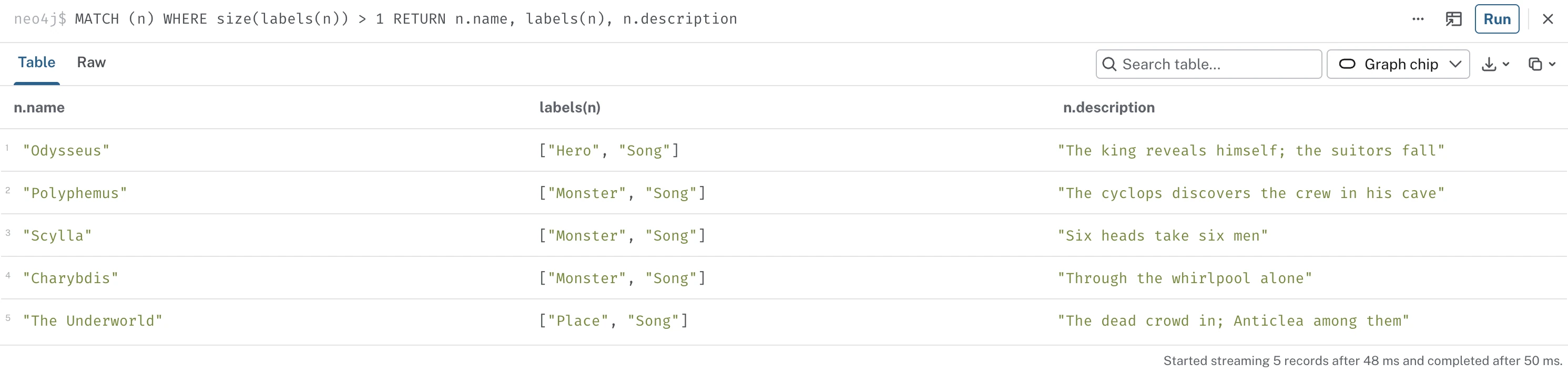
Odysseus was incorrectly labelled as both a Hero and a Song. Scylla was also labelled as both a Monster and a Song, and so forth. I had five nodes that had encountered an identity collision.
The mistake I made
In EPIC: The Musical, five of the songs are named after the character or place they're about. So when LOAD CSV reached the song "Odysseus," MERGE found the character, added the Song label to him, and overwrote his description with the song's. The database obeyed my MERGE rule - I just hadn't noticed that five nodes in my data shared names with other nodes.
To fix this, I renamed the five colliding songs in the CSVs - e.g. Odysseus (song), Scylla (song) - updated their rows in relationships.csv, and rebuilt from scratch:
MATCH (n) DETACH DELETE nThis means: "find every node; delete it and any connections attached to it."
Now I could re-run the two LOAD CSV queries from above and recount to be sure that my data was correct, with 130 nodes:
| nodes | relationships |
|---|---|
| 130 | 235 |
Deciding what makes a node unique is a significant data modelling decision. If you get it wrong, you'll be fixing duplicates at 1am while drinking your sixth cup of tea. Be better than me.
Graph Data Modeling Fundamentals
Removing labels from data
Remember back when I was first importing the data, I used CREATE CONSTRAINT to set the rule ("no two Entity nodes may share a name") and MERGE (n:Entity {name: …}) afterwards while loading every row in. The Entity label existed purely so that the CREATE CONSTRAINT rule had something to attach to while the data was being ingested. It was structural and temporary.
The reason I now have to remove it is that our visualisation tool in Aura (Bloom) colour-codes by label, and if every node shares the Entity label, they will all be the same colour. No one wants to see one hundred and thirty identical beige dots, so let's remove it:
DROP CONSTRAINT entity_nameThis is Cypher speak for "forget that entity_name rule I set earlier."
MATCH (n:Entity) REMOVE n:EntityThis query finds only the nodes wearing the Entity label and peels it off, revealing the real labels I defined in the CSV - Hero, Monster, Song. (Any node without the label doesn't need it removed, so there's no reason to check them all.) Now they get to shine with their own colours in the visualisation.
Customizing a data visualisation with Bloom
Everything visual in this post comes from Neo4j's visualisation tool, Bloom, which lives in the Aura console sidebar. (You may also know it as Explore - it's the same tool, and it has carried both names at different points.) It costs nothing extra and requires no libraries or code. Here's how I used it to go from grey dots to a colour-coded constellation.
A Bloom visualisation is made up of two concepts:
- A Scene: your current canvas of which nodes you've decided to visualise. Think of it like an arrangement of magnets on your fridge.
- A Perspective: the colours, icons, sizes, and captions that define how each kind of node looks. Think of this like the design of the fridge magnets themselves.
Your data visualisation styling lives in the Perspective, but only if you save it there. After any styling session, click "Apply styling to Perspective" (bottom-right of the canvas) or you'll be designing your nodes all over again next time. I learned this the hard way.
Getting the graph on canvas
As I had already loaded my data and verified it in the Query tab, my data was already in Aura. So now I could do things like:
- Search for nodes. Type a label like
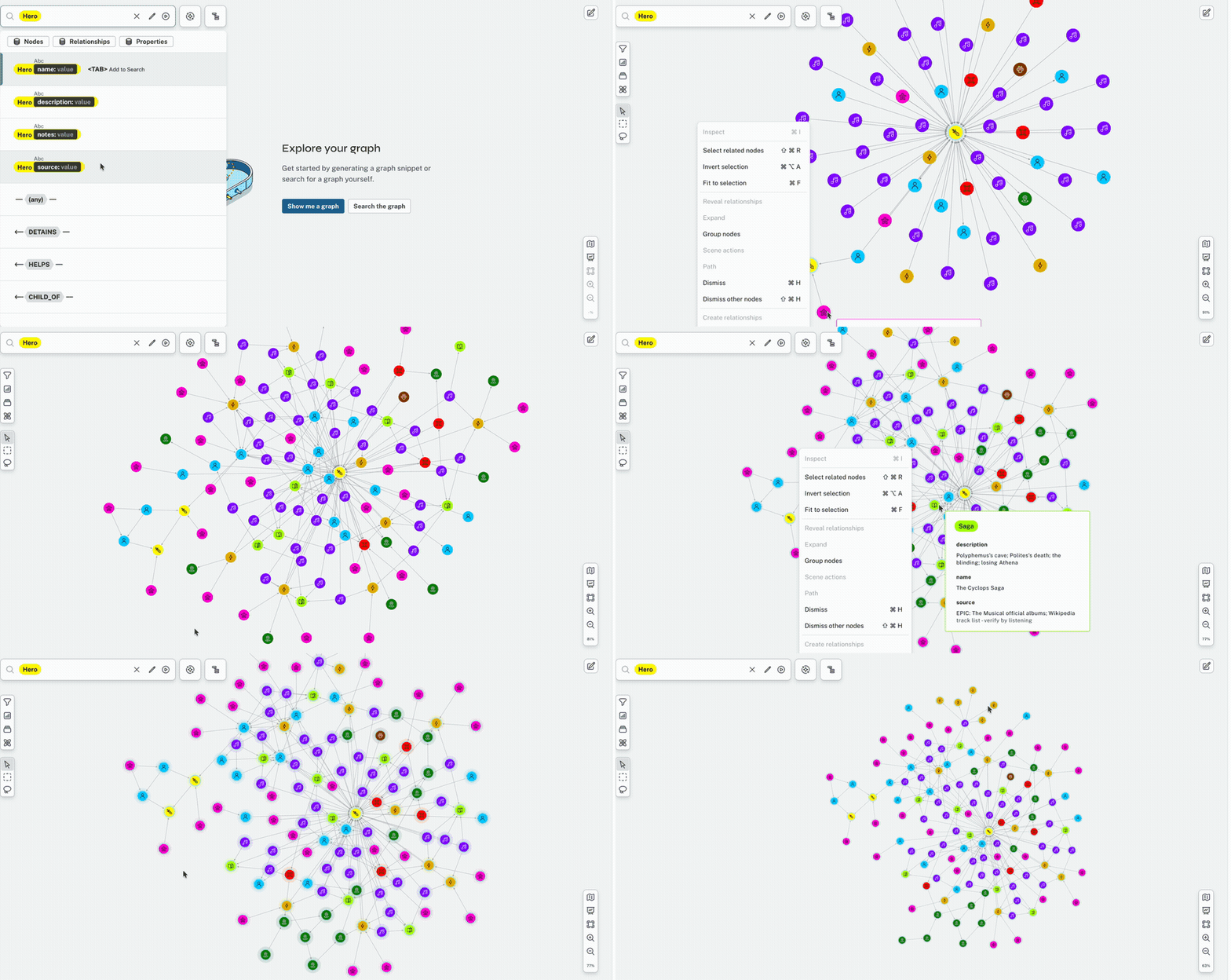
HeroorSongor a name like Poseidon in the search bar and hit enter. - Reveal the arrows. Select everything (Cmd/Ctrl+A), then right-click on any node, and click Expand All. (Right-click a node, not the empty canvas - I made this mistake and was very confused for a very long time.) Each expand pulls in one more hop of connections, so a few rounds of select-and-expand blooms the whole graph out of a single search:
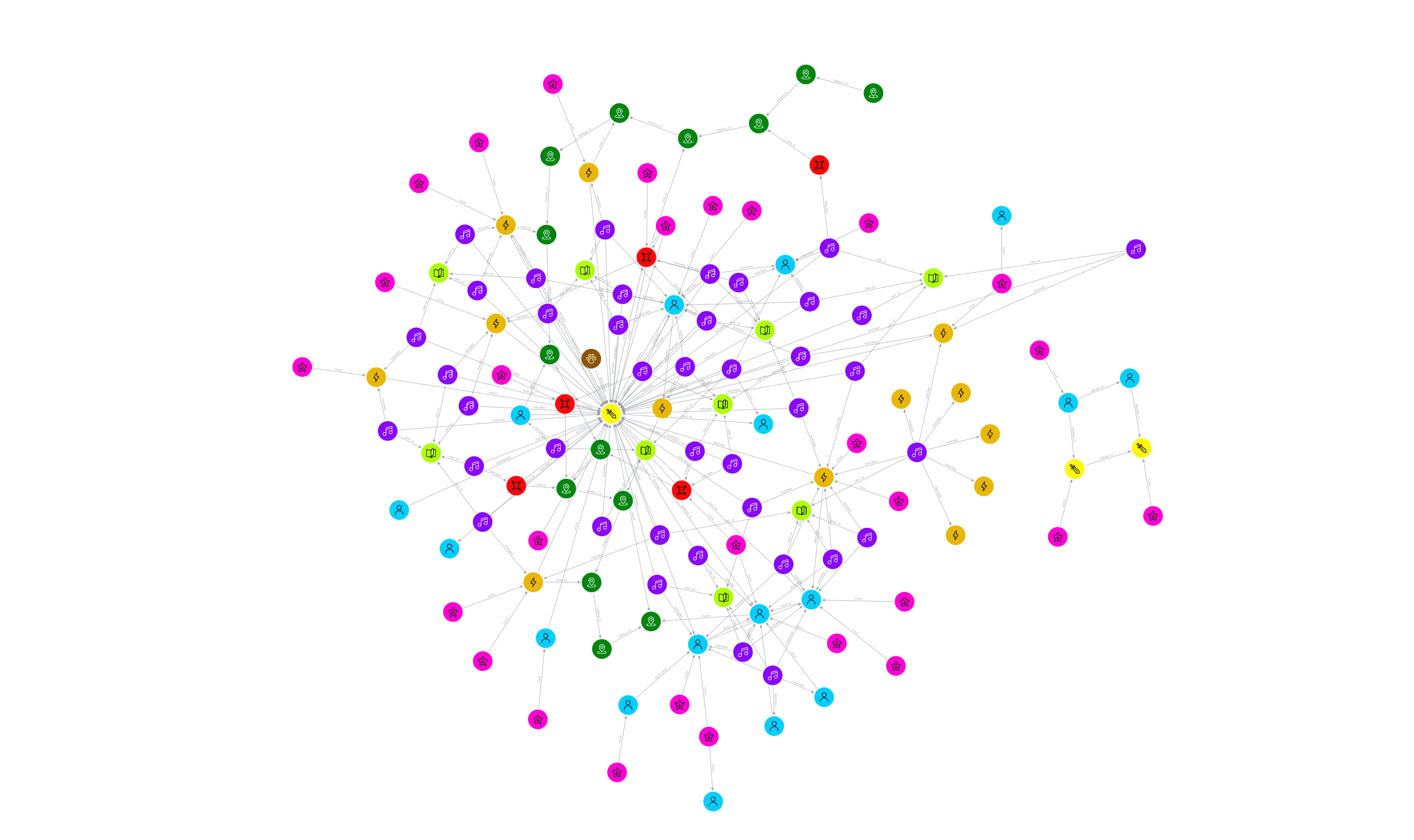
Why is Agamemnon all alone over there?
The first time the full data visualisation was created, I noticed a small cluster of nodes floating off to one side, connected to each other but absolutely nothing else: Agamemnon, Menelaus, Helen of Troy, Clytemnestra, and the actors who play them (Lupita included).
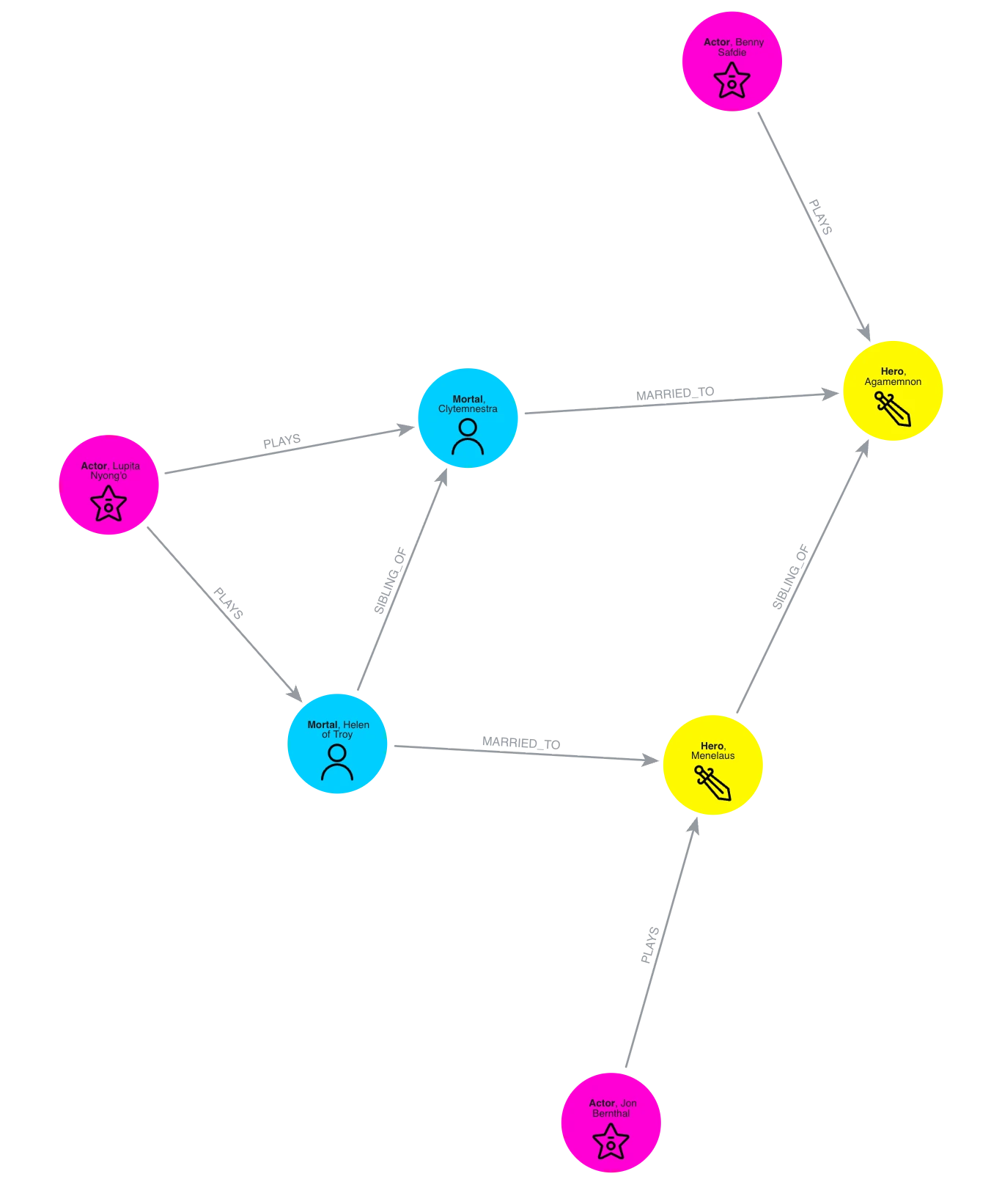
Every one of those nodes was in the CSVs, but nothing links them to Odysseus's side of the story. My spreadsheet had held that gap without me noticing; the graph showed it in one glance - and fixing it is just as quick. Homer even supplies the missing link: in Book 4, Telemachus visits Menelaus for news of his father. One query writes that visit into the graph:
MATCH (t:Mortal {name: "Telemachus"})
MATCH (m:Hero {name: "Menelaus"})
MERGE (t)-[r:VISITS]->(m)
SET r.detail = "Seeking news of his father; Homer Book 4"
Read aloud: "find Telemachus and Menelaus, connect them - unless they're already connected - then write the note on the arrow." The note is on its own SET line because MERGE only creates something new when it can't find an exact match for what's inside it. Written this way, MERGE asks one simple question - are they connected? - and SET handles the note. Here's the island after that one query, bridged to the mainland through Telemachus:
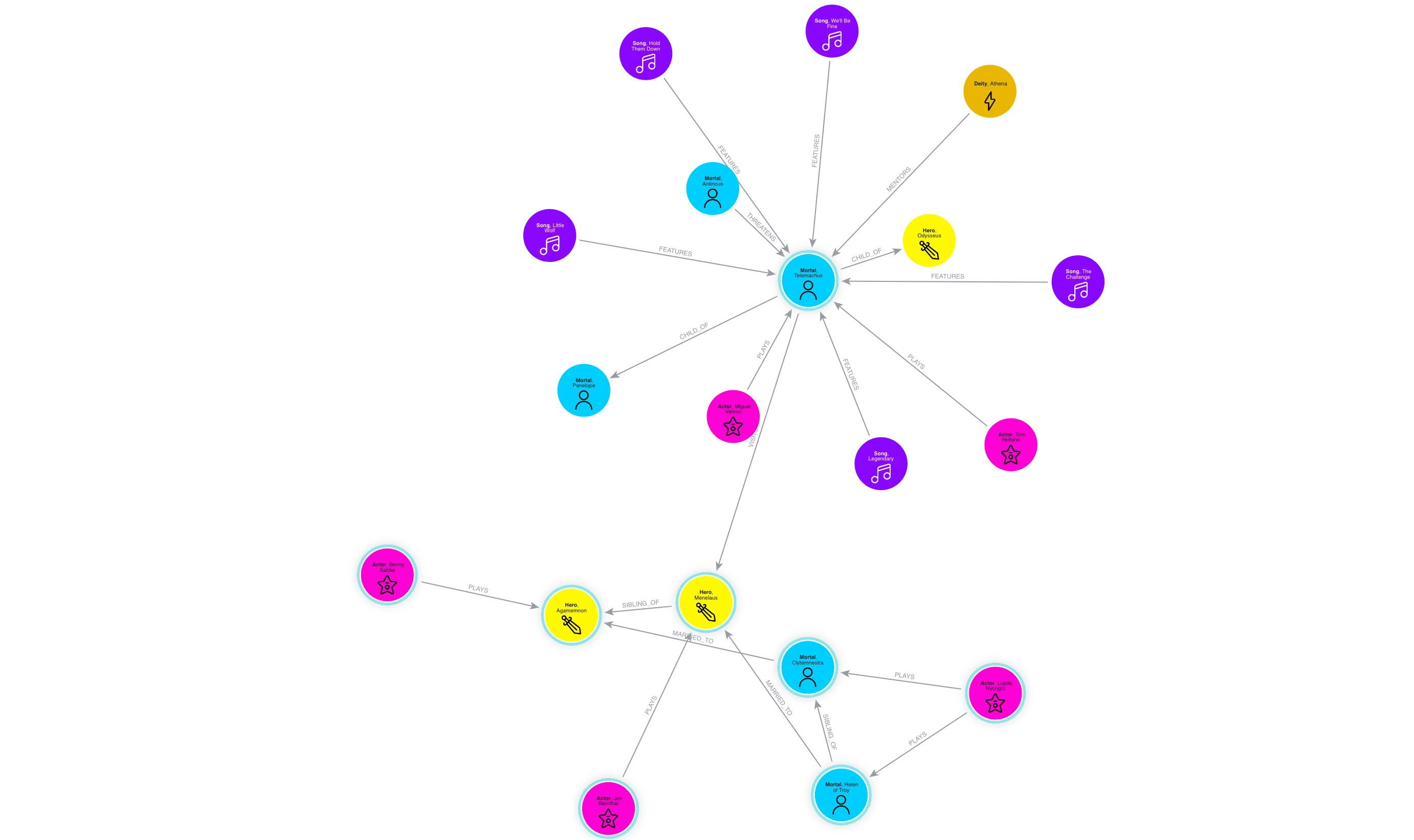
The whole fix took one query and about ten seconds - my CSVs never even noticed. I expected reshaping a data model to feel like surgery, but with Aura it was completely pain-free.
Using the Legend panel
All styling happens in the Legend panel on the right. Click a category's swatch and you can set the colour, size, icon, and caption of each node and relationship arrow. You can also choose which properties you want shown, or reveal them on hover to avoid crowding.
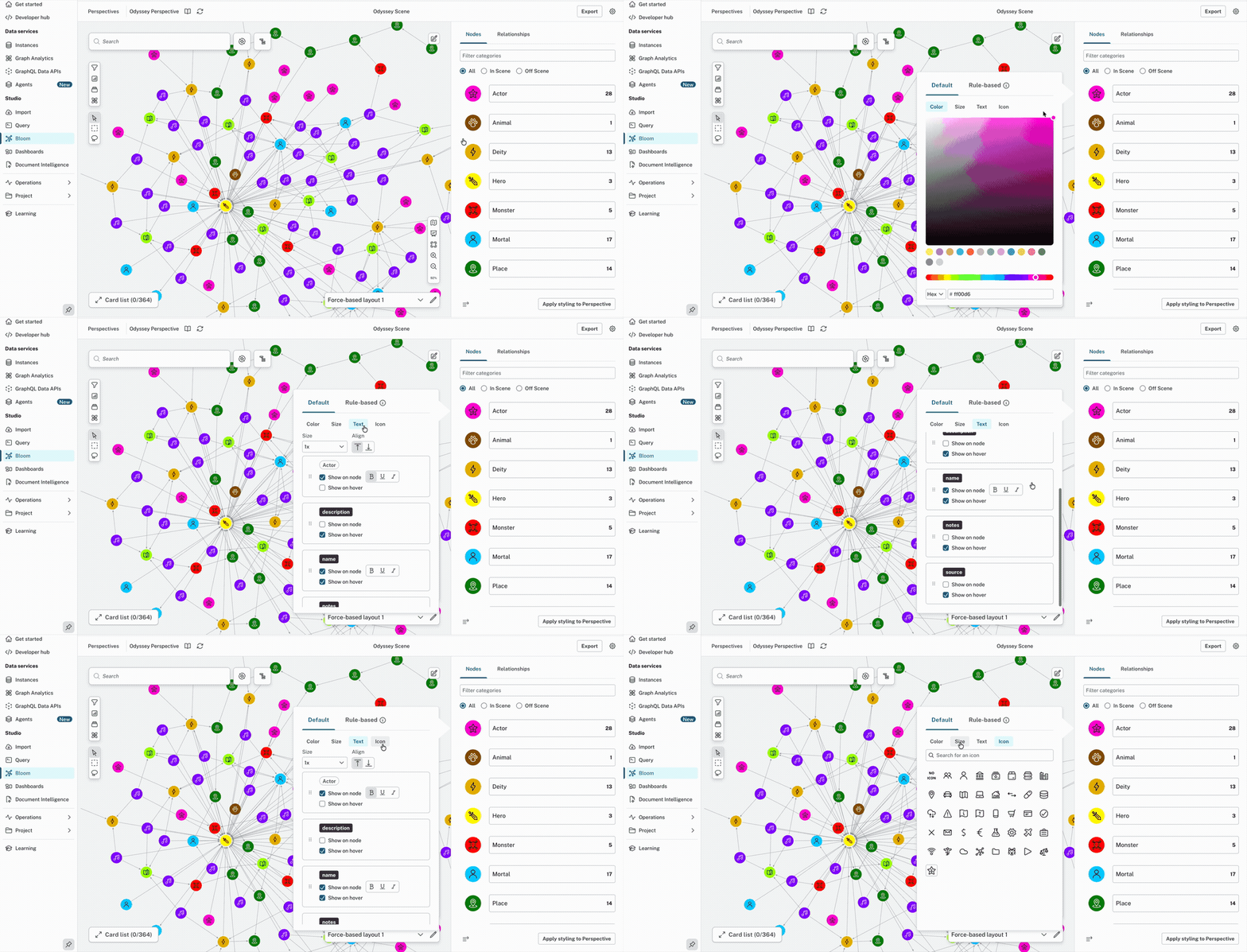
The Export button captures exactly what's on your canvas, so if you zoom into any corner of the graph, it will export your current view as a crisp image instead of you having to screenshot it yourself.
Asking the data questions
How popular is Odysseus?
First, I wanted to know how many connections Odysseus has in the story - all the characters, songs, places, monsters, and deities that directly connect to him in some way throughout The Odyssey. So this was the Cypher query I used:
MATCH p = (:Hero {name: "Odysseus"})--()
RETURN p
This means: "find the hero Odysseus, and show me every connection he has, in any direction." The --() part means "any relationship to anything".
And here was the result:
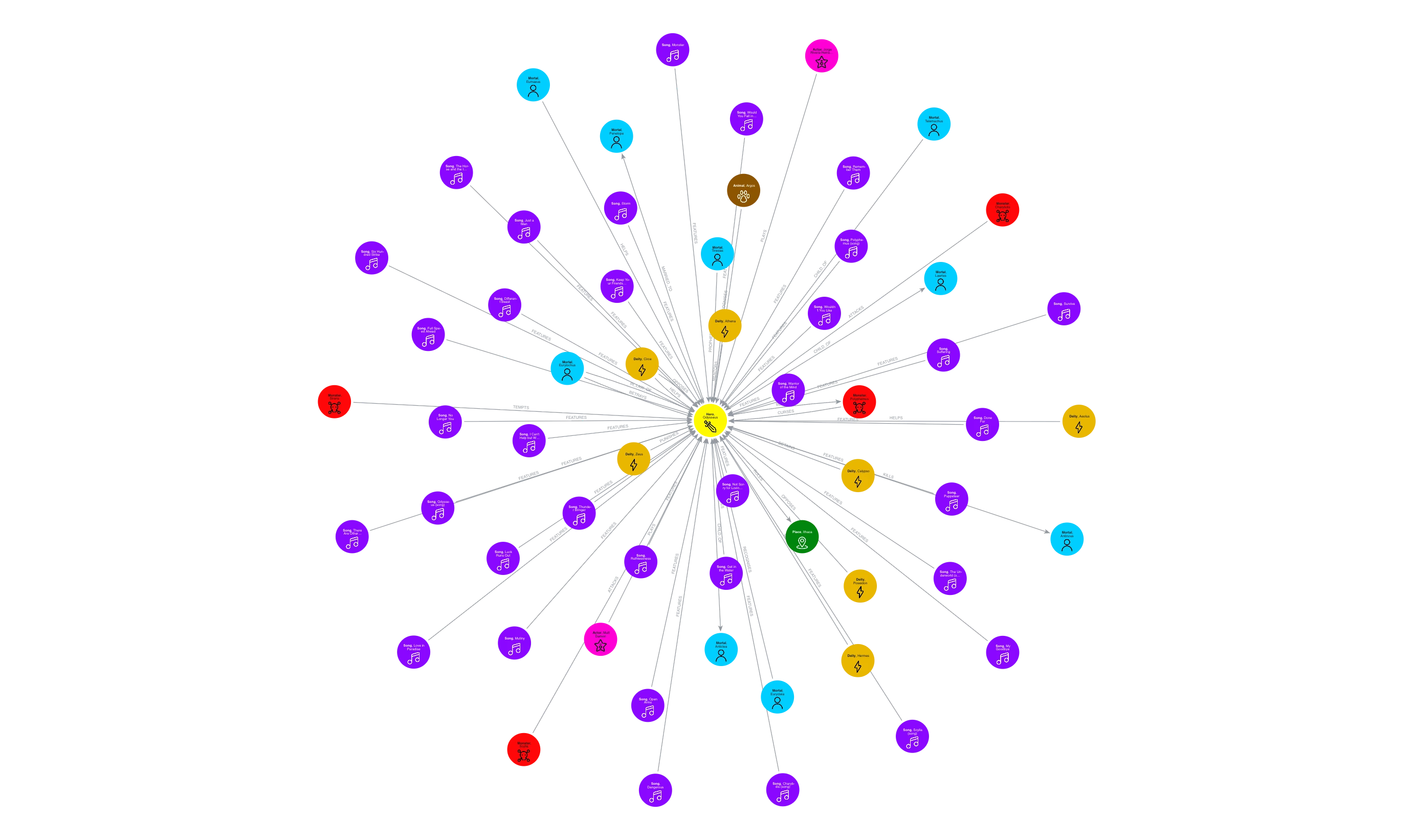
The query returns 61 connections and switching the result to Table view shows them exactly as the sentences they are:
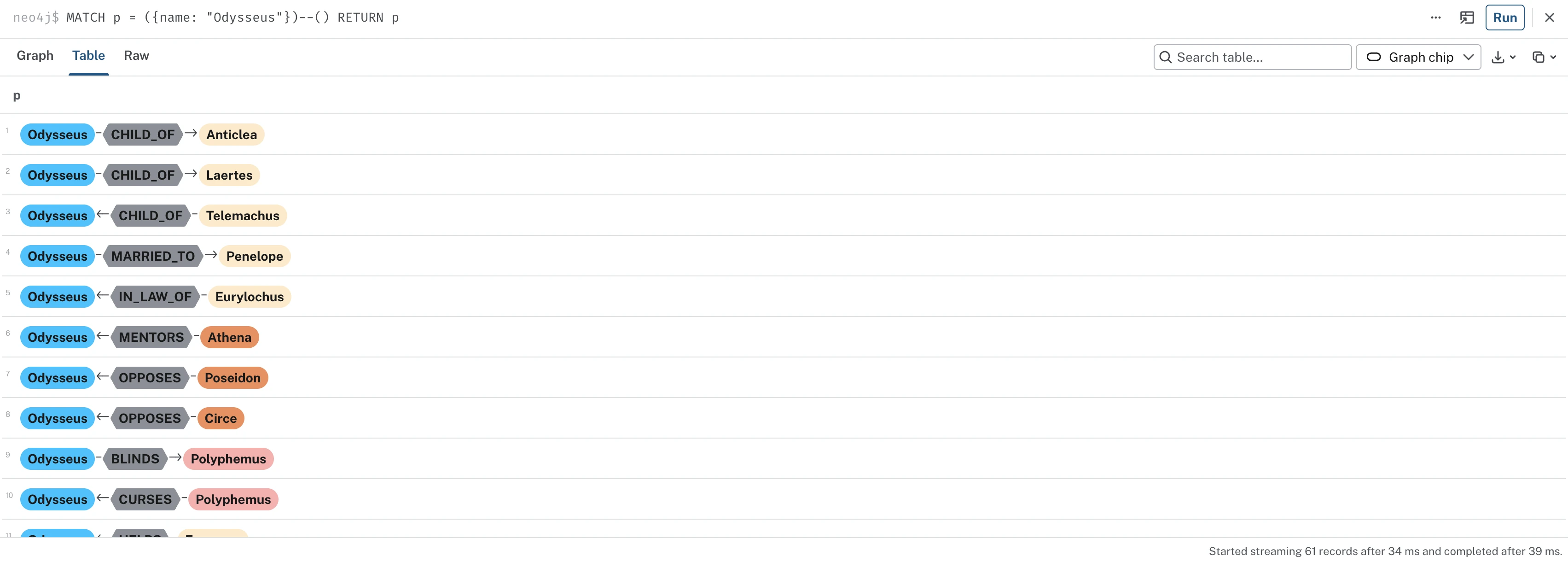
Now we can see every connection of Odysseus's story: his wife, his son, his mentor, his monsters, the songs he's featured in, and the two different actors who have played him in the film and musical.
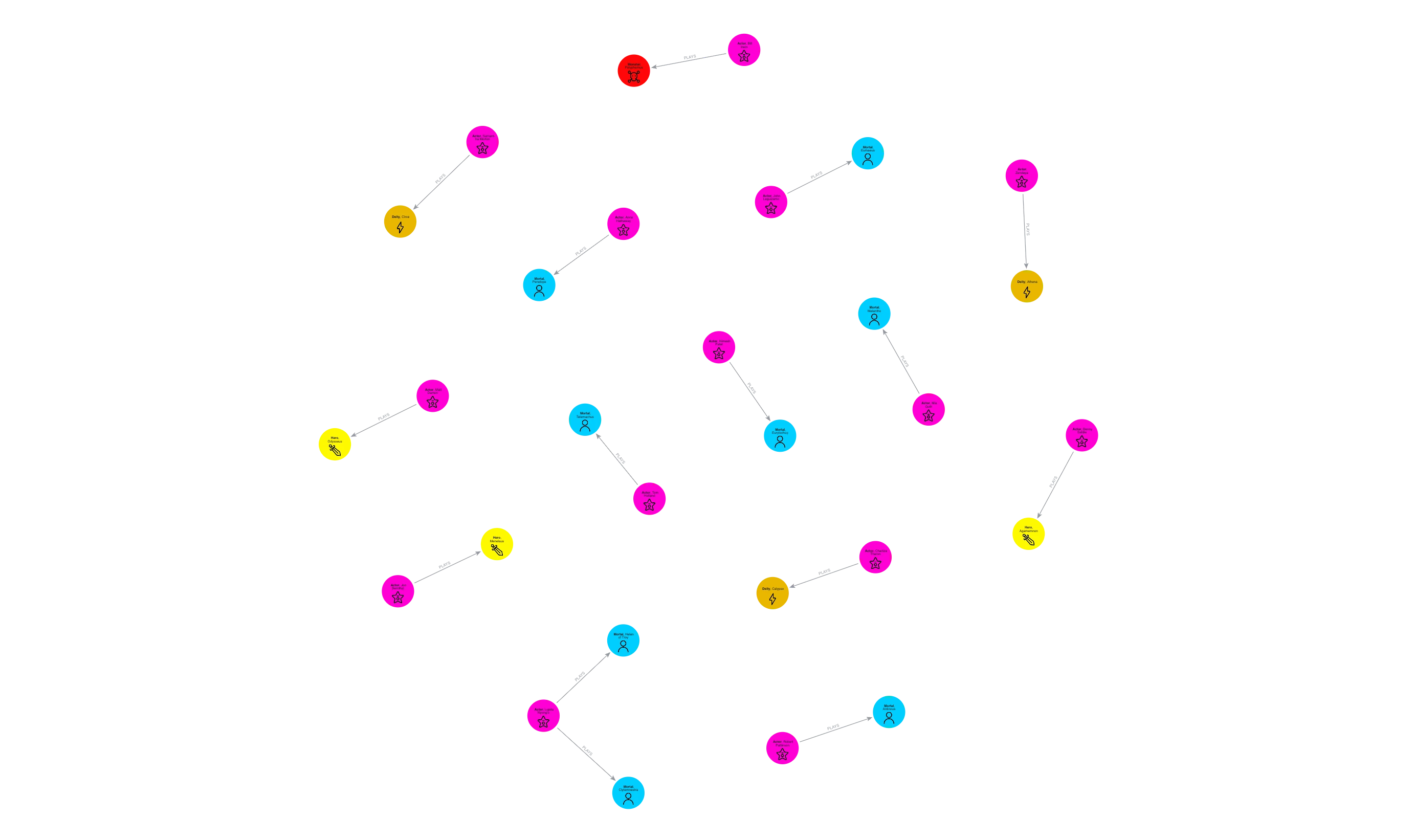
Who is playing who in the film adaptation?
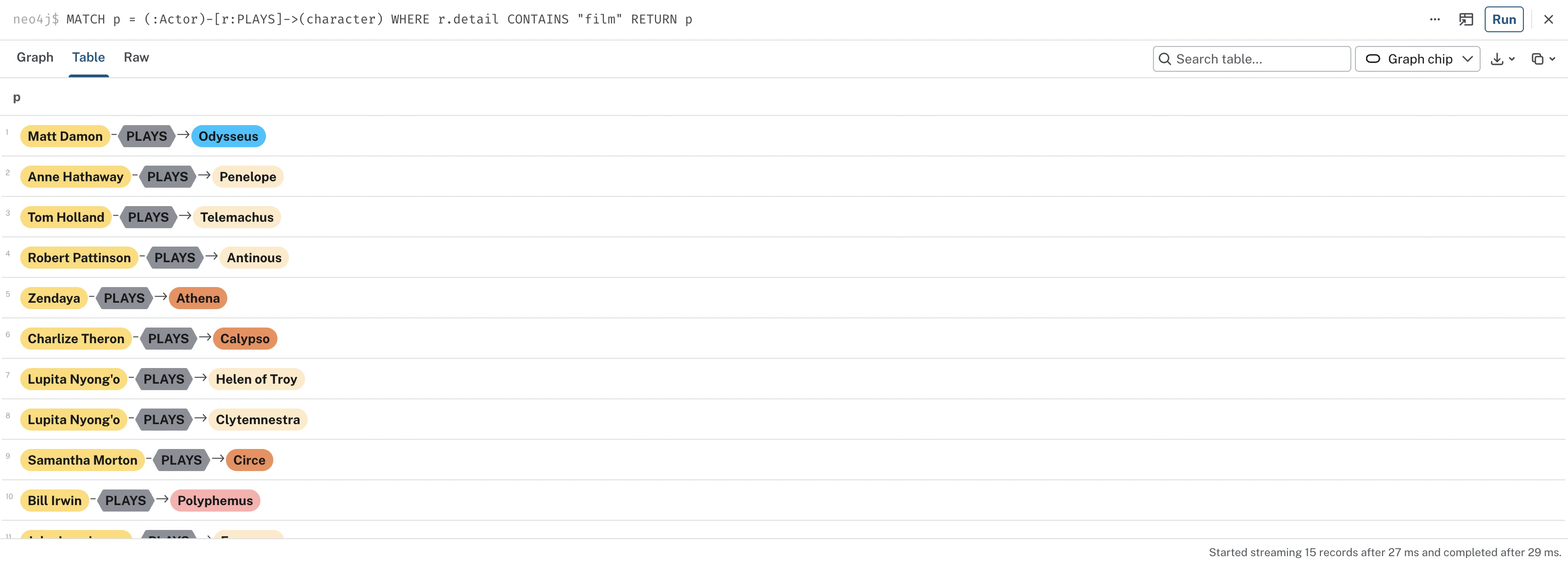
I was curious about who is playing which character in Christopher Nolan's film adaptation, so I used the query below to find out:
MATCH p = (:Actor)-[r:PLAYS]->(character)
WHERE r.detail CONTAINS "film"
RETURN p
I used the WHERE line to add a filter in my query. This is because both the film cast and the musical cast use the same PLAYS relationship, but each arrow carries a detail property that tells us whether the actor belongs to the musical or the film. So here I'm filtering on a property of the relationship itself instead of the node. I'm basically saying: tell me which actor plays which character, but only in the "film".
The same results in Table view read as a cast list:
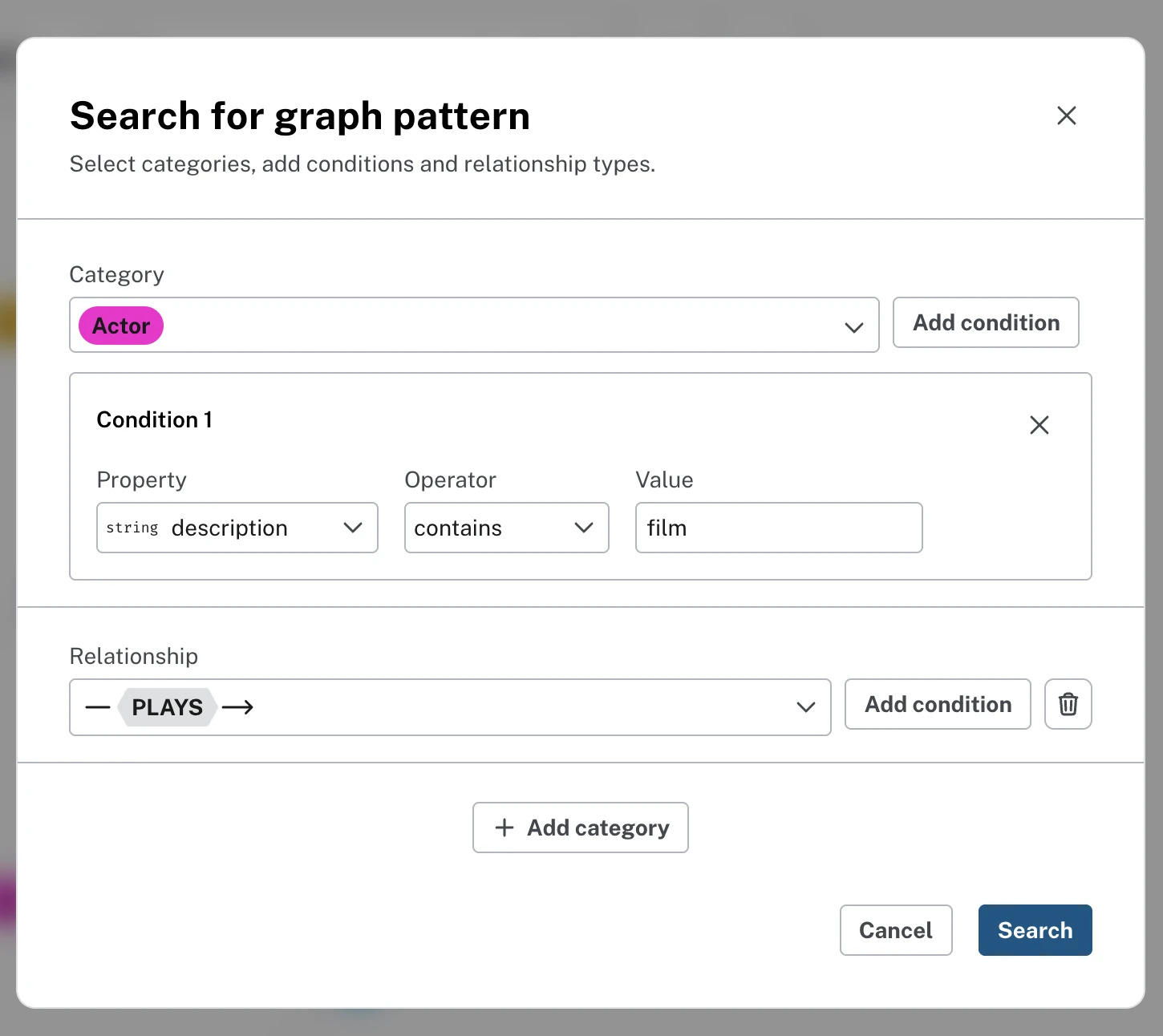
For anyone who doesn't like writing queries: Bloom has a Query Builder feature that lets you build the same Cypher query visually. You just pick the category, add the condition and choose the relationship:
Who plays who in the musical adaptation?
Jorge Rivera-Herrans went to great lengths to involve his supporters in the production of his musical adaptation of The Odyssey, so I was curious to see which talented singers had taken on which roles. To ask this question of the data, I used the same query with one word changed:
MATCH p = (:Actor)-[r:PLAYS]->(character)
WHERE r.detail CONTAINS "musical"
RETURN p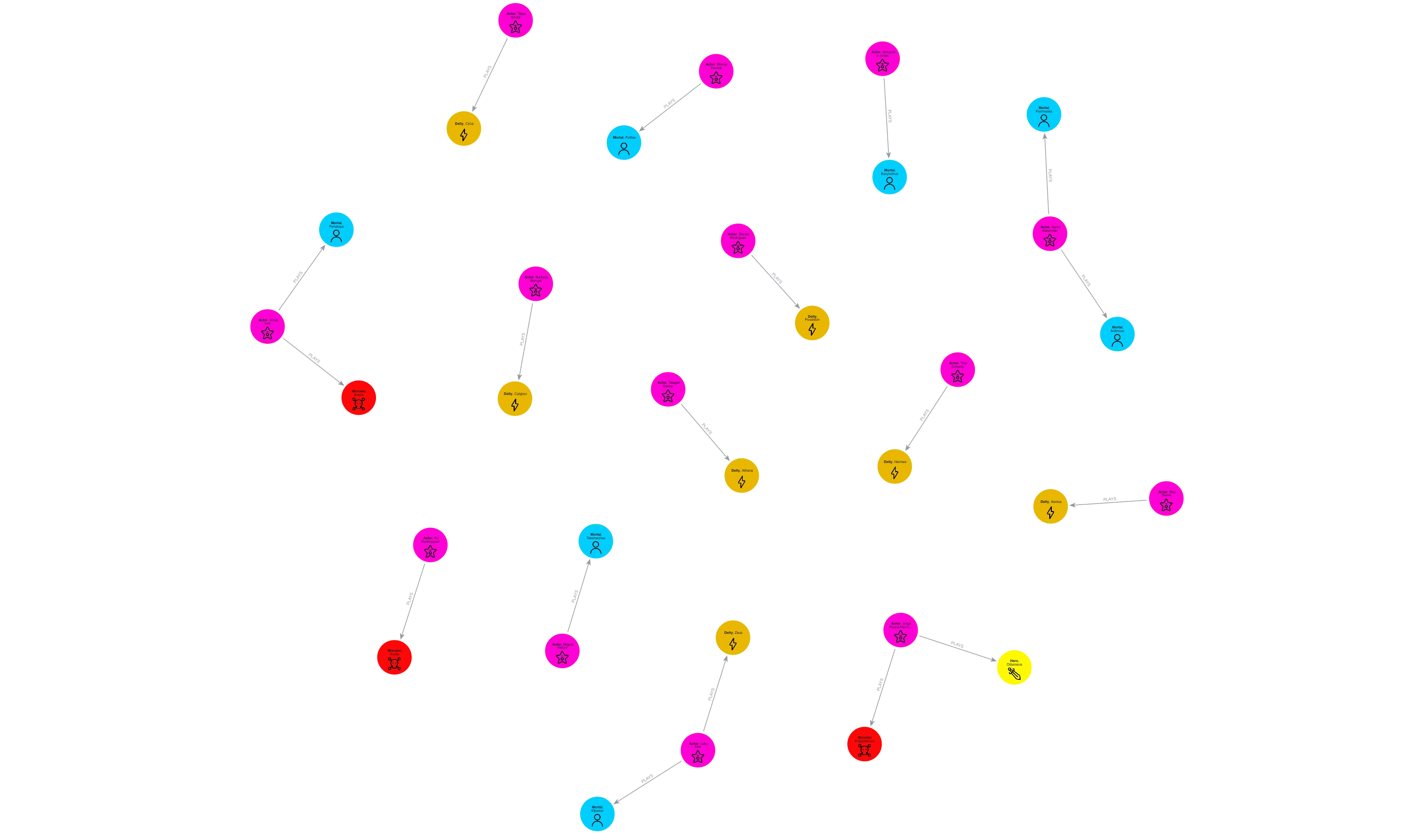
The full cast list, straight from the query:
| actor | plays |
|---|---|
| Jorge Rivera-Herrans | Odysseus, Polyphemus |
| Anna Lea | Penelope, Sirens |
| Miguel Veloso | Telemachus |
| Teagan Earley | Athena |
| Steven Rodriguez | Poseidon |
| Luke Holt | Zeus, Elpenor |
| Armando Julián | Eurylochus |
| Steven Dookie | Polites |
| Talya Sindel | Circe |
| Barbara Wangui | Calypso |
| Troy Doherty | Hermes |
| Ayron Alexander | Antinous, Perimedes |
| KJ Burkhauser | Scylla |
| Kira Stone | Aeolus |
Who has played Odysseus?
MATCH p = (:Actor)-[:PLAYS]->(:Hero {name: "Odysseus"})
RETURN p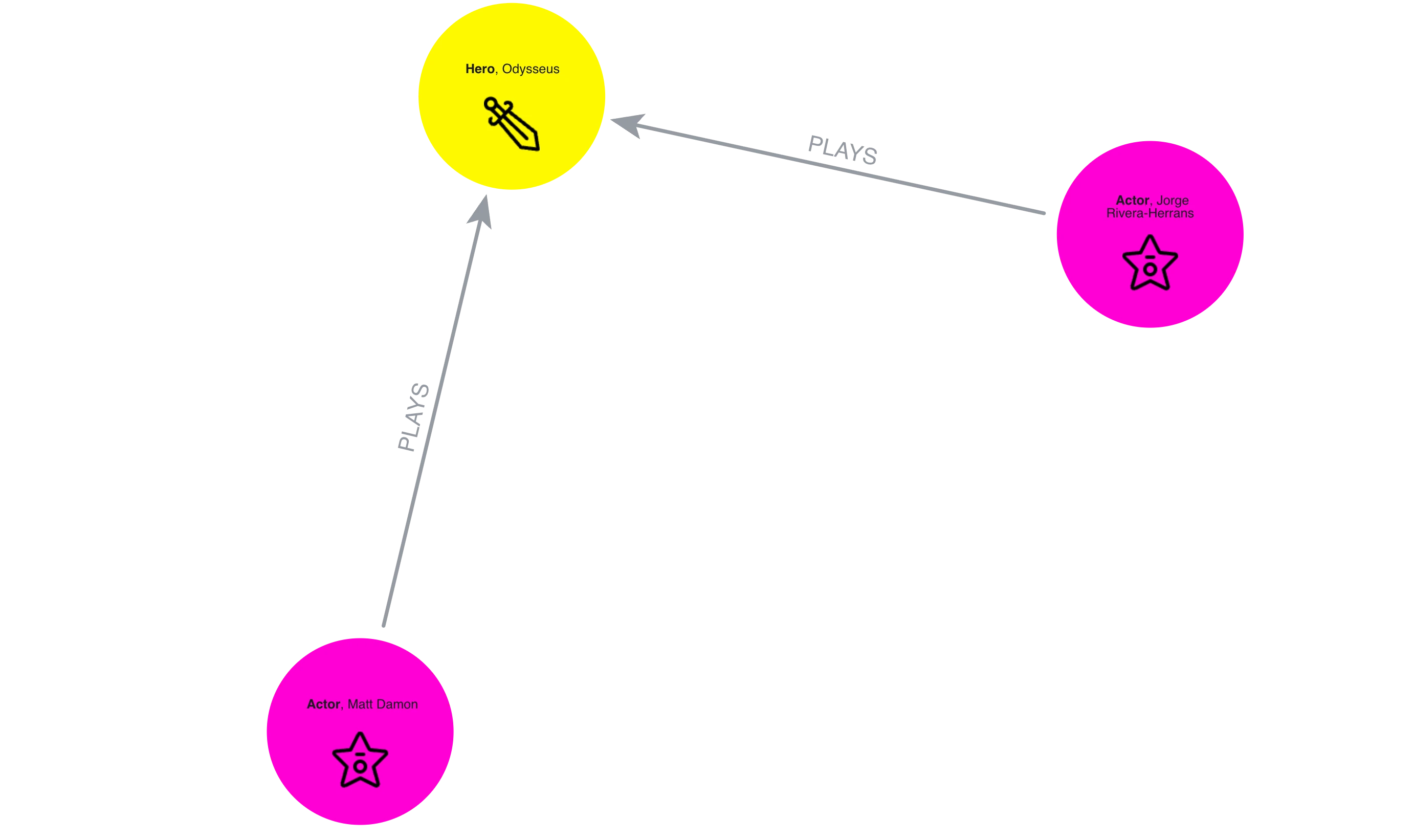
See how I didn't add a WHERE filter here. It's because I wanted to know who plays Odysseus in both the musical and the film - aka Matt Damon and Jorge Rivera-Herrans, a Hollywood A-lister and a man who cast a musical over TikTok.
What did EPIC cut from Homer?
While building the dataset, whenever something existed in the poem but not the musical, I noted it - "Homer only" - in the node's notes property. Which means the graph can now answer a question adaptation-obsessed fans argue about: what did the musical leave out of Homer's original poem?
MATCH (n:Mortal|Place) WHERE n.notes CONTAINS "Homer only"
RETURN n.name, n.description
The :Mortal|Place part means "a node wearing either label" - the cuts turned out to be a mix of people and places, and naming the labels keeps Cypher from checking every node in the database.
The answer:
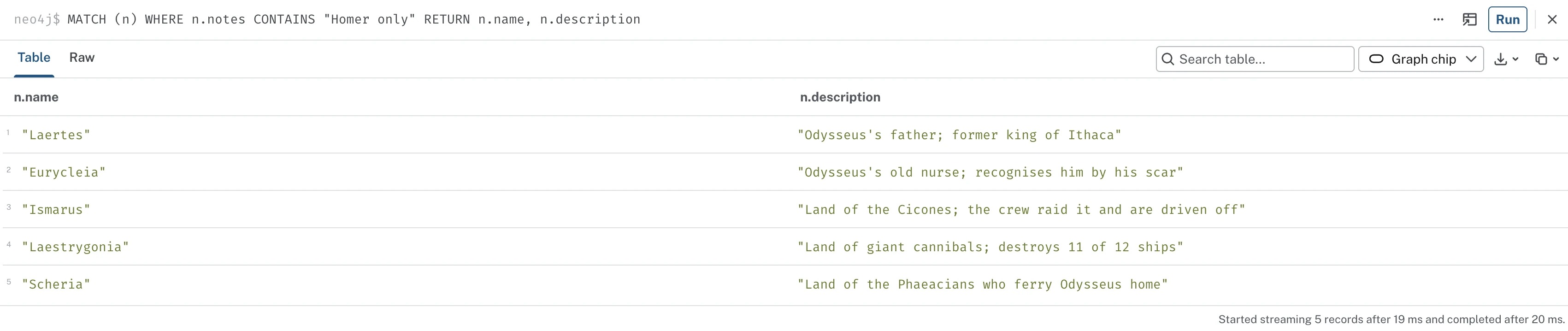
What's really cool is that I can query the node properties as well as the nodes themselves, because I recorded them in the data. It's a nice thing to remember: whatever you include in your data can be queried, even if it doesn't appear as an actual node itself.
How did Odysseus get home?
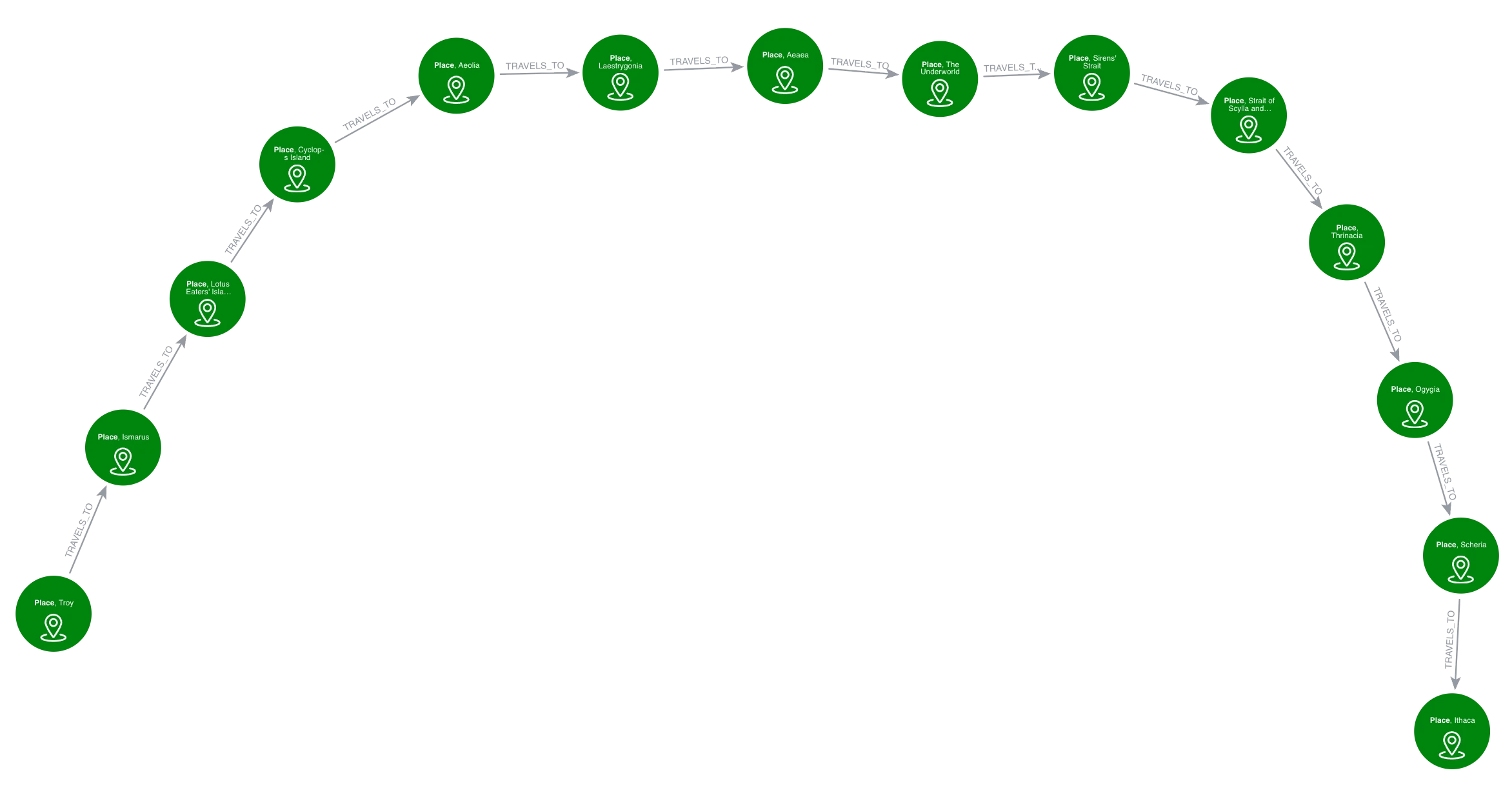
In the tale of The Odyssey, Odysseus goes from Troy to Ithaca, but what does that journey look like, and how many stops does he make along the way? I asked the data with Cypher:
MATCH p = (:Place {name: "Troy"})-[:TRAVELS_TO*]->(:Place {name: "Ithaca"})
RETURN p
The * means "keep following the TRAVELS_TO arrows, stop after stop, until we reach Ithaca". The result is the entire journey, with every stop included, shown as a single path:
So whose story is it, anyway?
The simplest question you can ask of a graph is a humble one: who touches the most of the story? To answer it, we count every character's connections and rank them:
MATCH (n)-[r]-()
WHERE NOT n:Song AND NOT n:Saga AND NOT n:Actor
RETURN n.name AS character, count(r) AS connections
ORDER BY connections DESC
LIMIT 10
The WHERE NOT line excludes songs, sagas, and actors from the ranking because we're only counting the characters in the story.
The verdict:
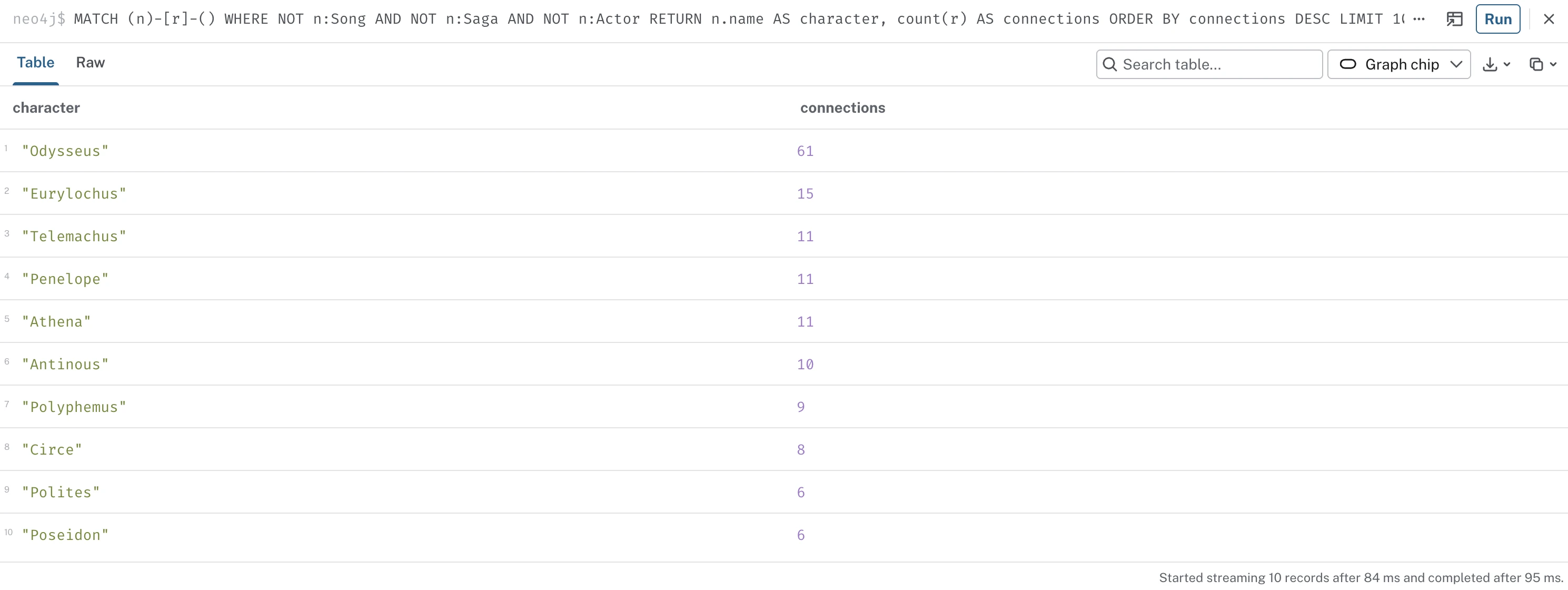
Odysseus wins, obviously, with 61 connections. In second place: Eurylochus, the man who opened the wind bag, with more connections than even Penelope and Athena. And Poseidon, whose ten-year grudge is basically the whole plot, scrapes in with just six connections - because as we said at the start, he only has beef with Odysseus because of his son - the Cyclops.
What I learned about learning Cypher
I built this project to teach myself Cypher and Aura, and I would highly recommend learning a query language on data you already love. Every query had an answer I actually cared about, which meant every mistake was worth debugging - and, as you've seen, there were so many mistakes.
If you want to learn in the same way I did, these are the GraphAcademy courses that got me here, all free:
- Neo4j Fundamentals - what a graph database actually is
- Cypher Fundamentals - reading and writing the Cypher queries in this post
- Importing Data Fundamentals - to understand what I did with
LOAD CSV - Graph Data Modeling Fundamentals - how to avoid my data modeling mistakes entirely
Away from the screen, I've also been reading "Neo4j: The Definitive Guide" by Luanne Misquitta & Christophe Willemsen, which helped some of the Cypher concepts make sense.
If you'd like to explore the graph yourself, download the Odyssey data model using the button below. You can import that straight into Aura using the Data Importer and the whole graph will build itself. All you'll have to worry about is querying it all.
The Odyssey data model, ready for Aura's Import tool:
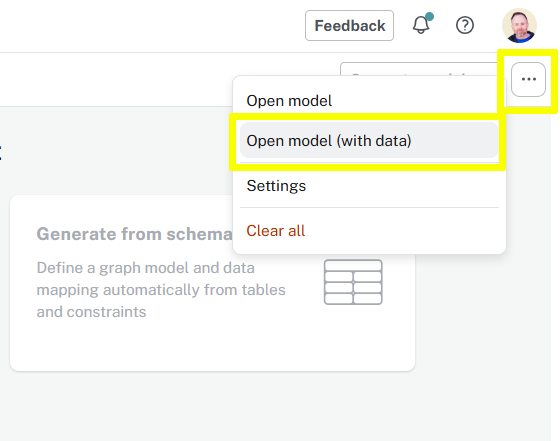
Download the model and open it using the Open model (with data) button in the ... menu.


Comments (0)
Loading comments...