

This week I needed test data for a support bot I'm building. So I created three fake learners in Aura, built to seem like real ones:
- One learner veteran with completed courses and a certification
- One learner who was mid-course
- One learner who had just signed up and done nothing yet
I named them Beyoncé, Kelly, and Michelle.
Beyoncé got the full career: two courses, a certification and completion dates.
Kelly got one course in progress.
Michelle got an account and nothing else. This was deliberate, because "brand new user with no activity" is usually the kind of case that could break something, and I wanted to test it.
Here's the whole Cypher script. If you'd like to follow along, paste it into a blank Aura instance and the girl group is yours.
Notice how little Michelle gets:
// The courses and certification our learners will work towards
MERGE (fundamentals:Course:TestData {title: 'Neo4j Fundamentals'})
MERGE (cypher:Course:TestData {title: 'Cypher Fundamentals'})
MERGE (importing:Course:TestData {title: 'Importing Data Fundamentals'})
MERGE (cert:Certification:TestData {title: 'Test Graph Certification'})

// Beyonce: the full career - two courses, a certification, completion dates
MERGE (bey:User:TestData {email: 'beyonce@example.com'})
  SET bey.displayName = 'Beyonce Knowles'
MERGE (bey)-[:HAS_ENROLMENT]->(e1:Enrolment:CompletedEnrolment:TestData {id: 'bey-nf'})
  SET e1.completedAt = datetime() - duration('P14D')
MERGE (e1)-[:FOR_COURSE]->(fundamentals)
MERGE (bey)-[:HAS_ENROLMENT]->(e2:Enrolment:TestData {id: 'bey-cypher'})
MERGE (e2)-[:FOR_COURSE]->(cypher)
MERGE (bey)-[:HAS_ENROLMENT]->(e3:Enrolment:CompletedEnrolment:TestData {id: 'bey-cert'})
  SET e3.completedAt = datetime() - duration('P3D')
MERGE (e3)-[:FOR_COURSE]->(cert)

// Kelly: one course, in progress
MERGE (kelly:User:TestData {email: 'kelly@example.com'})
  SET kelly.displayName = 'Kelly Rowland'
MERGE (kelly)-[:HAS_ENROLMENT]->(e4:Enrolment:TestData {id: 'kelly-imp'})
MERGE (e4)-[:FOR_COURSE]->(importing)

// Michelle: an account. That's it. That's the test.
MERGE (michelle:User:TestData {email: 'michelle@example.com'})
SET michelle.displayName = 'Michelle Williams'MERGE only creates something new when it can't find an exact match for everything inside its brackets. So the brackets should hold only the thing that never changes - the identity, like an email address - and everything else goes in SET.
Imagine the display name lived inside the brackets instead: MERGE (bey:User {email: 'beyonce@example.com', displayName: 'Beyonce'}). If you fix a typo in her name and run the script again - the pattern no longer matches exactly, so Cypher creates a second Beyoncé. That's a duplication you do not want. So identity in the brackets, details that could change in SET, and there's only ever one of her.
Here's what that script draws. Each MERGE chain becomes a little trail of arrows, except one:
The Cypher script ran and, just like that, three learners were created in my test data. Lovely.
I opened my database and ran a query to admire them:
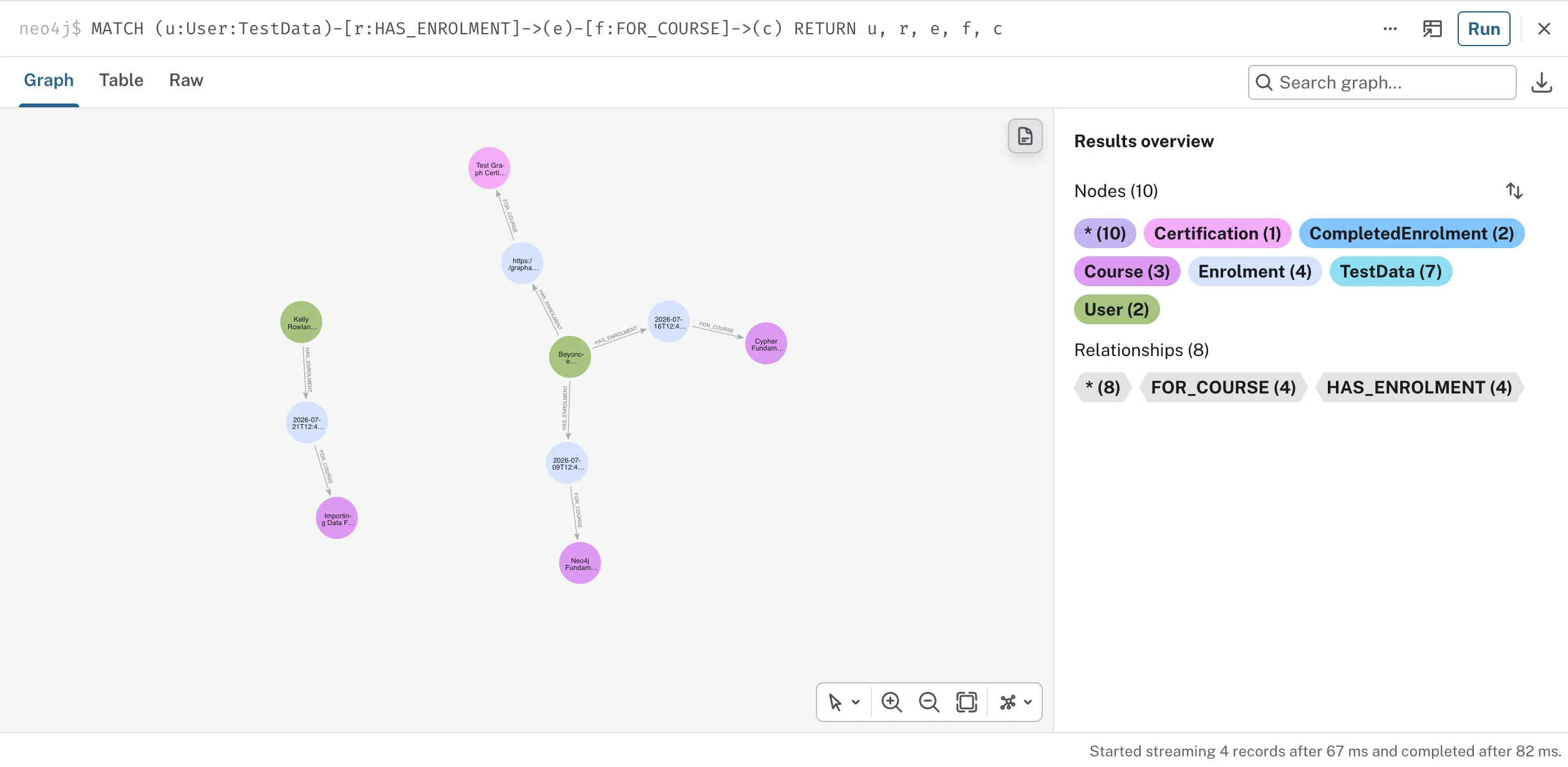
MATCH (u:User:TestData)-[r:HAS_ENROLMENT]->(e)-[f:FOR_COURSE]->(c)
RETURN u, r, e, f, cI like to read my Cypher queries out loud like sentences to understand them. It turns syntax into meaning (and it makes hidden requirements much easier to hear).
If I read this one aloud, it roughly translates to: "find my test users, their enrolments, and the courses those enrolments point to."
The results came, and the graph bloomed on screen. Beyoncé sat in the middle with all her achievements. Kelly floated nearby with her one course. But there was no Michelle.
The hidden requirements in your queries
My first instinct was that my Cypher script had failed. Maybe Michelle was never even created! But she was right there in the script. So I checked the database directly:
MATCH (u:User:TestData) RETURN u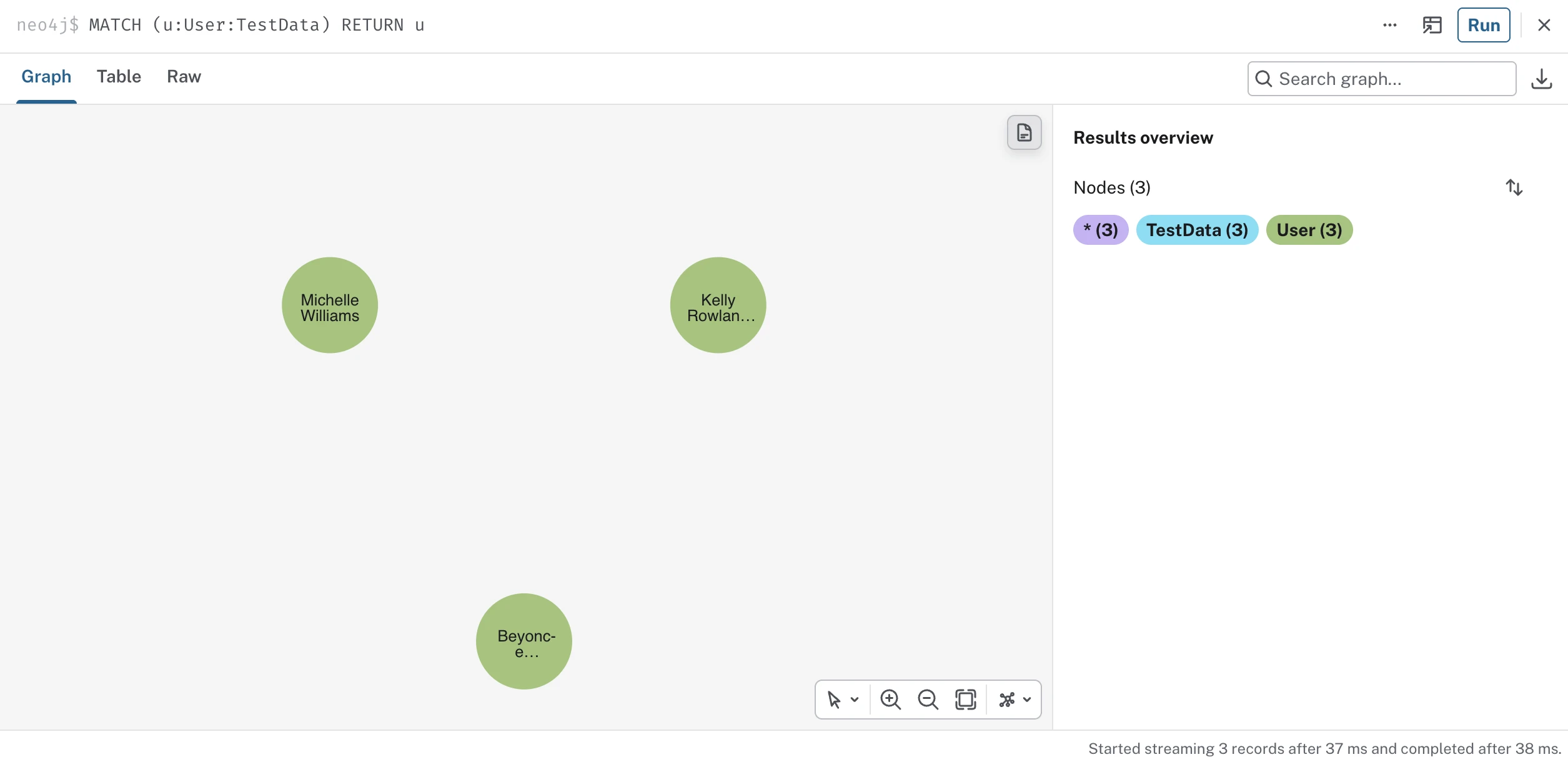
Michelle was present and correct. So she did exist, but for some reason, she just hadn't appeared when I asked to see everyone.
Does your query have a bouncer at the door?
Here's where I went wrong: my first query didn't just say "show me my users." It said "show me my users who have an enrolment that leads to a course."
Every part of that query includes a requirement. Beyoncé qualifies. Kelly qualifies. But Michelle gets turned away at the door. The pattern took one look at her and said "no", like a bouncer at the door of a really exclusive club.
Anchor the query on the things
Instead of describing one long chain of requirements that every user must meet, I anchor the query on the users themselves, and ask for their details through expressions that are allowed to come back empty:
MATCH (u:User:TestData)
RETURN u.displayName AS learner,
  [ (u)-[:HAS_ENROLMENT]->()-[:FOR_COURSE]->(c) | c.title ] AS courses,
  COUNT { (u)-[:HAS_ENROLMENT]->(:CompletedEnrolment) } AS completed
Read aloud: "find every test user and, for each one, give me the list of their course titles and a count of their completions."
-
The first line, from
MATCHtoRETURN, says: "find me every user in my database, no conditions". -
The square brackets on the second line are a list comprehension that says: "follow this little pattern from the user and collect whatever you find into a list." It's a concept you might know from Python: a shorter way of building a new list out of something you already have. Here, for each user, the comprehension builds a fresh list from whatever that little pattern finds (e.g. their course titles).
-
Inside the braces after
COUNT, I have(u)-[:HAS_ENROLMENT]->(:CompletedEnrolment)which is basically saying: for each user, find every spot in the graph where the user has enrolled and completed that enrolment, and count them. Beyoncé meets that pattern twice - one completed course, one completed certification - so her count is 2. Michelle doesn't meet it at all, so her count is 0. But a count of zero doesn't remove you, so Michelle still shows up in the results.
When I run the new Cypher query, there Michelle is at last:
| learner | courses | completed |
|---|---|---|
| Kelly Rowland | ["Importing Data Fundamentals"] | 0 |
| Michelle Williams | [] | 0 |
| Beyonce Knowles | ["Cypher Fundamentals", "Test Graph Certification", "Neo4j Fundamentals"] | 2 |
And if you've met list comprehensions in Python, this is the same idea wearing Cypher clothes:
courses = [enrolment.course.title for enrolment in user.enrolments]Rows and list items come back in whatever order the graph found them, so if you want a guaranteed order, that's what ORDER BY is for.

But isn't there a keyword for this?
There is: OPTIONAL MATCH.
While it does work, I was pointed to why it's worth avoiding as a habit, and the reason taught me something about how Cypher actually works.
Let's say Beyoncé has three enrolments and is in two teams, and I use OPTIONAL MATCH to ask for both:
MATCH (u:User {email: 'beyonce@example.com'})
OPTIONAL MATCH (u)-[:HAS_ENROLMENT]->()-[:FOR_COURSE]->(c)
OPTIONAL MATCH (u)-[:MEMBER_OF]->(t)
RETURN u.displayName AS learner, c.title AS course, t.name AS teamMATCHwould find Beyoncé. That's one row.- The first
OPTIONAL MATCHwould find the three courses she's enrolled in. That's three rows. - The second
OPTIONAL MATCHwould run on each of those three rows, finding her two teams every time, resulting in six rows of duplicated results.
| learner | course | team |
|---|---|---|
| Beyonce | Neo4j Fundamentals | Team Destiny's Child |
| Beyonce | Neo4j Fundamentals | Team Jay Z |
| Beyonce | Cypher Fundamentals | Team Destiny's Child |
| Beyonce | Cypher Fundamentals | Team Jay Z |
| Beyonce | Test Graph Certification | Team Destiny's Child |
| Beyonce | Test Graph Certification | Team Jay Z |
Six rows for one woman, full of repeats. You can hide the repeats with collect(distinct ...), but the database still did all six rows of work. On one Beyoncé, it's fine. On thousands of users, this is how queries get slow.
The better way to write this query is to use list comprehensions, like I did up top:
MATCH (u:User {email: 'beyonce@example.com'})
RETURN u.displayName AS learner,
  [ (u)-[:HAS_ENROLMENT]->()-[:FOR_COURSE]->(c) | c.title ] AS courses,
  [ (u)-[:MEMBER_OF]->(t) | t.name ] AS teams
Which would give us this result instead:
| learner | courses | teams |
|---|---|---|
| Beyonce | ["Neo4j Fundamentals", "Cypher Fundamentals", "Test Graph Certification"] | ["Team Destiny's Child", "Team Jay Z"] |
Each question expands from Beyoncé separately, gets its answers, and comes home as its own list, so the results never multiply and your database doesn't do as much work.
Why this matters beyond my girl group
This was an easy fix for my three test learners, but the same trap scales to thousands of nodes.
- Count customers through their purchases, and the ones who haven't bought anything yet could vanish from your dashboard.
- List employees through their project assignments, and the brand-new starter disappears from the org report.
- Count learners through their course activity, and the stalled ones drop out of sight.
Notice the pattern: the rows that go missing always belong to the unconnected data points that probably need your attention the most.
The rule I now go by
When the question is "show me the things," I anchor the query on the things themselves and ask for everything else in a form that's allowed to come back empty: a list comprehension, a COUNT { } or COLLECT { } subquery.
Before assuming the data is missing, re-read the query and ask what it requires. Your data is probably fine - it's just standing outside a pattern that never invited it in.
This isn't even my first run-in with an invisible absence. The last one hid inside 130 nodes of Homer's Odyssey, where an entire plotline sat disconnected from the story for a long time before the graph gave it away. Here's how that one unfolded.
When you're done experimenting, one line cleans up everything the initial seed script created:
MATCH (n:TestData) DETACH DELETE nRead aloud: "find everything labelled test data, and delete it along with its relationships."

Comments (0)
Loading comments...