Aura Agent lets you build retrieval systems that query your knowledge graph from the Aura Console without writing code.
In this lesson, you will learn:
-
What Aura Agent is
-
When to use Aura Agent
-
How Aura Agent works
What is Aura Agent?
Aura Agent is a no/low-code platform in the Aura Console that enables you to create AI agents capable of turning natural language questions into graph queries that run against your data in AuraDB.
You connect an agent to an AuraDB instance containing your graph data. When a user asks a question, the agent interprets the request, retrieves the relevant data from the graph, and returns the result. You can build, test, and refine agents visually in the Console — without writing application code.
Aura Agent is useful when you want to build agents that retrieve data from your AuraDB knowledge graph using natural language, enabling developers to create AI assistants grounded in their graph data.
How Aura Agent works
Each agent follows an agent loop to reason through a request, decide what to do next, execute the right tools, and return a grounded response.
Instead of jumping straight to an answer, the agent orchestrates a sequence of steps:
-
Interpret user input: Understand the user’s question, identify the goal, and determine what information is needed.
-
Plan the next steps: Decide which tool or tools to use and in what order.
-
Execute tools: Run the selected tool(s) to read data from your graph. The agent may call multiple tools, using the output of one step to guide the next.
-
Generate response: Use the retrieved data to produce a natural language answer grounded in the graph.
This iterative process — interpreting, planning, executing, and evaluating — repeats until the agent has enough information to respond.
Available tools
Your Aura Agent can be equipped with three types of read-only data retrieval tools to query your graph. Each tool type is designed for a different query pattern, allowing you to define the appropriate way to handle specific types of user requests.
Cypher Template
A Cypher Template tool runs a predefined, parameterized Cypher query against your database. The agent extracts parameter values from the user’s question and passes them to the query at runtime.
Use this tool when a question can be answered with a known, repeatable query — for example, "Get customer ALFKI". This approach provides predictable performance and control because the query structure is fixed in advance.
Similarity Search
A Similarity Search tool finds nodes based on semantic similarity using vector search.
Use this tool when you want to find related or similar entities — for example, "What products are similar to Chai?". This tool requires:
-
A vector index created in your AuraDB instance
-
Graph data populated with embeddings generated from a supported text embedding model
The agent uses the index to compare vector representations and return the most semantically similar nodes.
Text2Cypher
A Text2Cypher tool generates Cypher from natural language at runtime and executes it against your graph.
Use this tool when the question is not covered by an existing Cypher Template or Similarity Search tool — for example, "What are the top 10 products by revenue across all categories?". This tool provides flexibility by allowing the agent to dynamically create queries based on the user’s request.
Prerequisites to run Aura Agents
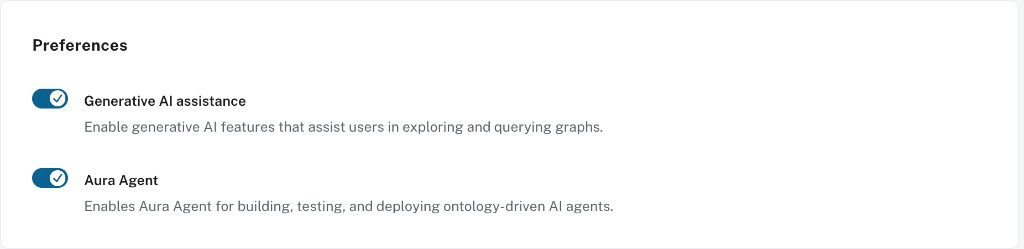
To use Aura Agent, ensure both of the following are enabled in your organization settings:
-
Generative AI assistance
-
Aura Agent. You can toggle this on and off when Generative AI assistance is enabled.
If the agent cannot connect to the instance, check that Tool authentication is enabled for the project. You configure this under Security at the organization level. Tool authentication is enabled by default for organizations created after May 2025. For older organizations, enable it if needed. See Aura Agent documentation for prerequisites.
Before starting the course, check that both toggles are ON. This course uses manual agent creation in the Aura Console: Create with AI and Create from scratch. agents are under Data Services → Agents in the Aura Console.
To create an agent, you need to be a Project Admin.
Checking your project role
Agent access is controlled by project roles. There are no dedicated agent-level roles.
| Role | Permissions |
|---|---|
Viewer and Member |
Can list and invoke all agents in the project |
Project Admin |
Can also create, update, and delete agents |
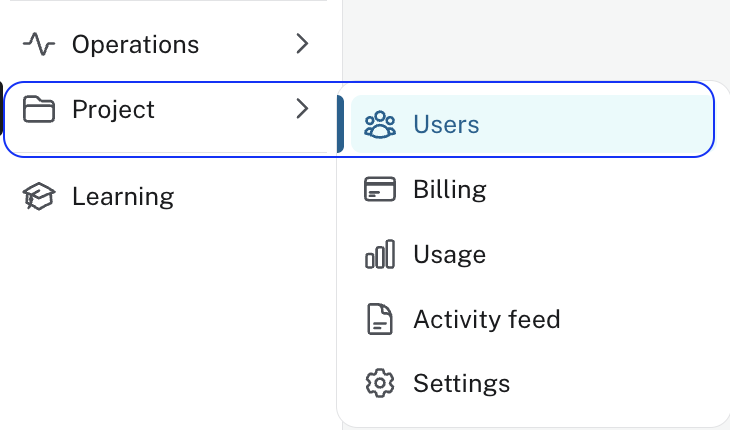
To check your role, go to Project → Users in the Aura Console left navigation:
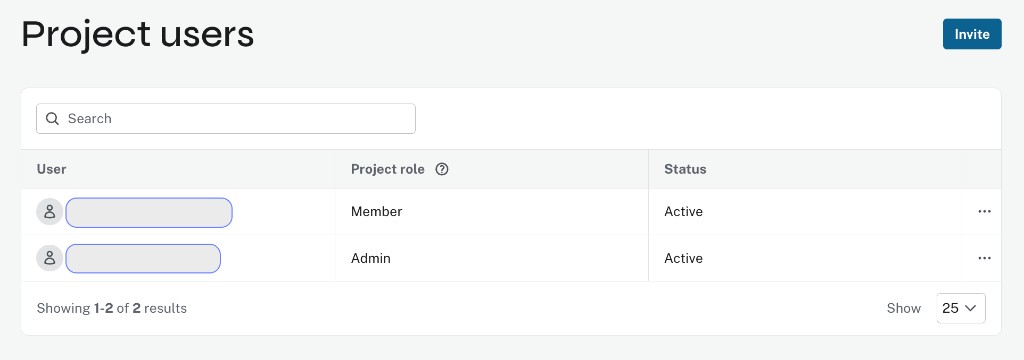
Your role is listed in the Project role column next to your email address:
To give a teammate access to an agent, add them to the Aura project with the appropriate role.
Check your understanding
Aura Agent scope
Which of the following is not something an Aura Agent does when it handles a user question?
Select the correct answer.
-
❏ Figure out what the user needs and which tool or tools to use
-
❏ Run the selected tools against the graph (it may run more than one)
-
✓ Write new or updated data back into the graph using tools
-
❏ Use retrieved data to produce a natural language answer
Hint
The lesson describes three steps ending in a natural language answer, and it states that an Aura Agent uses read-only tool types to query the graph. Writing results into the graph would change stored data.
Solution
Write new or updated data back into the graph using tools.
The agent interprets the request, runs read-only tools to read from the graph, then generates a response. It does not use tools to mutate the graph as part of answering.
Aura Agent tool types
Which of the following are tool types that an Aura Agent can use to query your graph? (Select all that apply)
-
✓ Cypher Template
-
✓ Text2Cypher
-
✓ Similarity Search
-
❏ The Import tool
Hint
The lesson lists three tool types used for querying: parameterized templates, natural language to Cypher at runtime, and similarity-based lookup. Loading or refreshing graph data from files is a separate console workflow, not one of those three agent tools.
Solution
Select Cypher Template, Text2Cypher, and Similarity Search. Those are the three read-only tool types in the lesson. The Import tool is for bringing data into an instance; it is not listed as an Aura Agent tool type.
Summary
In this lesson, you learned what Aura Agent is, how it works, and when to use it.
In the next lesson, you will learn how to design an agent with clear role, scope, and tool descriptions.