Cypher Template tools let the agent run predefined queries with values extracted from the user’s question.
In this lesson, you will learn how to:
-
Define a Cypher Template with named parameters
-
Add a Cypher Template tool to your agent in the Aura Console
What is a Cypher Template?
A Cypher Template is a pre-written, parameterized Cypher query. You define the query once and the LLM extracts parameter values from the user’s question and runs it. Queries use named $parameter placeholders. The LLM fills them from the user’s question at runtime.
Use a Cypher Template for common, repeated questions with known structure: "Get customer ALFKI", "List products in Beverages", "Top 10 customers by order count." Because the query is pre-written, results are deterministic: the same question always runs the same Cypher.
What are parameters?
Parameters are named placeholders in a Cypher query, prefixed with $. The LLM extracts the correct value from the user’s input and passes it in at runtime.
For example, the following query has one parameter, $customer_id:
MATCH (c:Customer {id: $customer_id})
RETURN c.companyName, c.contactName, c.city
When a user asks "Get me customer ALFKI", the LLM extracts "ALFKI" from the question and runs the query with $customer_id = "ALFKI". The same template handles "Get me customer QUICK" by substituting "QUICK", with no new query required.
A parameter can be one of four types: string, integer, float, or boolean.
| Type | Example parameter | Example question |
|---|---|---|
string |
|
"Get customer ALFKI" → |
integer |
|
"Show me the top 5 customers" → |
float |
|
"Products over $9.99" → |
boolean |
|
"Show discontinued products" → |
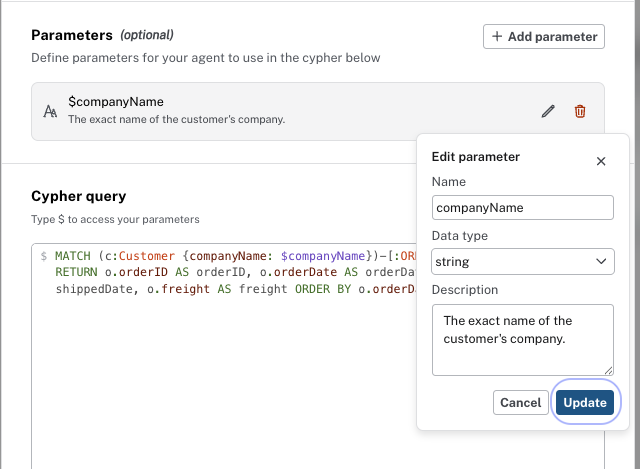
Each parameter needs a name, a data type, and a description. The LLM uses the description to understand what value to extract.
Write descriptions as instructions
A vague description like "The customer ID" gives the LLM little to work with. A specific description like "The customer ID, for example ALFKI or QUICK" tells it exactly what to look for and in what format.
Adding a Cypher Template tool
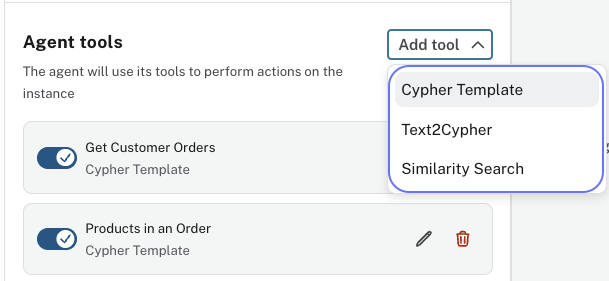
In the Aura Console, you add a Cypher Template from the agent configuration by clicking Add Tool → Cypher Template.
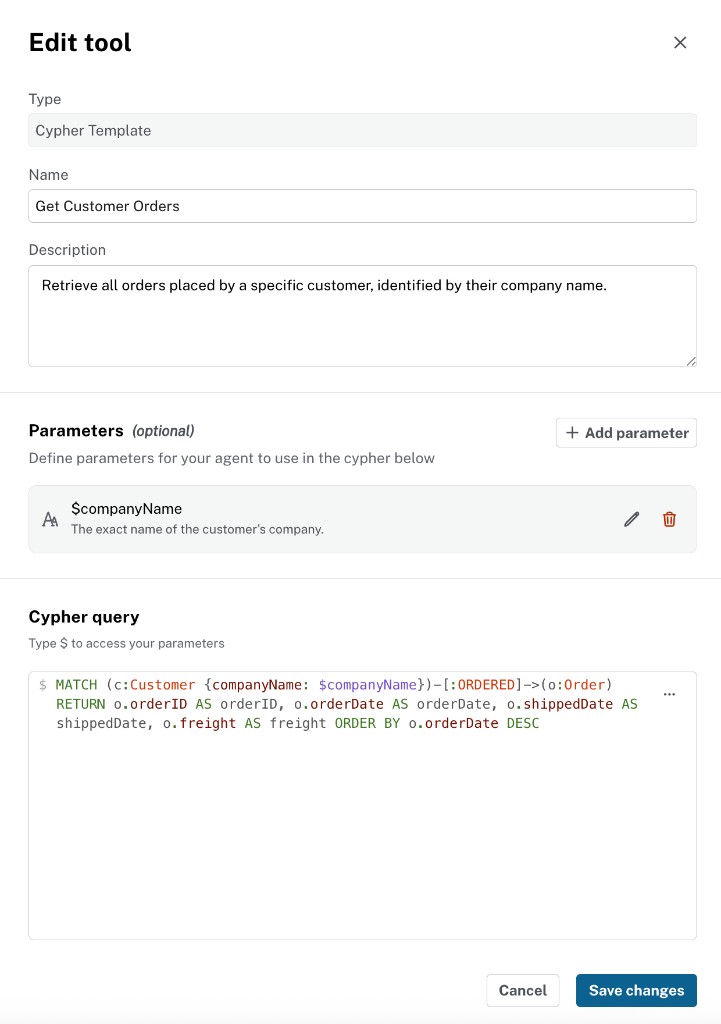
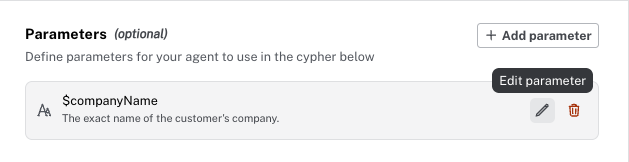
The tool configuration shows the name, description, parameters, and the Cypher query. Use the pencil icon to edit any of these fields.
To add or edit a parameter, open the parameter dialog and set the name, data type, and description.
Cypher Template best practices
Use Cypher Templates for questions you can predict in advance — common, repeated queries with a fixed structure. Each template you add reduces how often the agent needs to generate Cypher dynamically.
For best performance, Cypher Template queries should:
-
Return only relevant scalar properties — not whole nodes, relationships, paths, or embeddings
-
Avoid duplicate rows
-
Limit results to 10–50 rows to keep responses focused
For example, use RETURN c.id, c.companyName rather than RETURN c.
Check your understanding
Role of a Parameter
What is the role of a parameter in a Cypher Template tool?
Select the correct answer.
-
❏ It extracts the users phrases and hardcodes them into the Cypher string
-
✓ It is a named placeholder whose value the LLM extracts from the user’s question at runtime
-
❏ It defines which tool the agent must pick for every question
-
❏ It retrieves the full database schema for the template
Hint
Parameters use names like $customer_id. You write the query once. The LLM fills in values from the question.
Solution
It is a named placeholder whose value the LLM extracts from the user’s question at runtime.
A parameter is a named placeholder in the Cypher, prefixed with $. At runtime the LLM reads the parameter descriptions and supplies values from the user’s question, for example mapping "Get customer ALFKI" to $customer_id = "ALFKI".
Summary
In this lesson, you learned that a Cypher Template is a pre-written, parameterized query where the LLM extracts parameter values from the user’s question at runtime. Use it for common questions with known structure.
In the next lesson, you will add a Cypher Template tool to your agent.