In this lesson, you will use the Map visualization to plot nodes with coordinates onto a map.
Add coordinates to your data
The movie recommendations dataset includes the country of production for movies.
MATCH (m:Movie)
RETURN m.title as title, m.countries as countries
LIMIT 25
A Map visualization plots nodes that carry coordinates.
You can add coordinates to the movies in Cypher by creating Country nodes with coordinates and linking them to the movies.
Run this query to create Country nodes and link them to movies:
MATCH (movie:Movie)
UNWIND movie.countries as productionCountries
MERGE (country:Country {name: trim(productionCountries)})
MERGE (movie)-[:PRODUCED_IN]->(country)
The file country-coords.csv contains coordinates for the countries in the dataset.
Run ths query to add the coordinates to the Country nodes:
LOAD CSV WITH HEADERS
    FROM "https://data.neo4j.com/aura-dashboards/country-coords.csv" as coords

MATCH (country:Country)
WHERE lower(country.name) = lower(coords["Country"])

SET
    country.coord = point({
        latitude: toFloat(coords["latitude"]),
        longitude: toFloat(coords["longitude"])
    })
Point data type
You can use point({latitude: <degrees>, longitude: <degrees>}) in Cypher to create coordinates.
Latitudes are -90 to 90; longitudes -180 to 180. Use decimal degrees, not degree-minute-second strings.
View the Country nodes with their coordinates:
MATCH (c:Country)<-[:PRODUCED_IN]-(m:Movie)
RETURN m.title as title, c.name AS country, c.coord AS coordinates
ORDER BY title
LIMIT 25
Add a Map card
Your task is to add a new Map card to your dashboard that shows where movies were produced.
This cypher query returns the production countries for a specific movie:
MATCH (c:Country)<-[:PRODUCED_IN]-(m:Movie)
WHERE m.title = "Dancer in the Dark"
RETURN c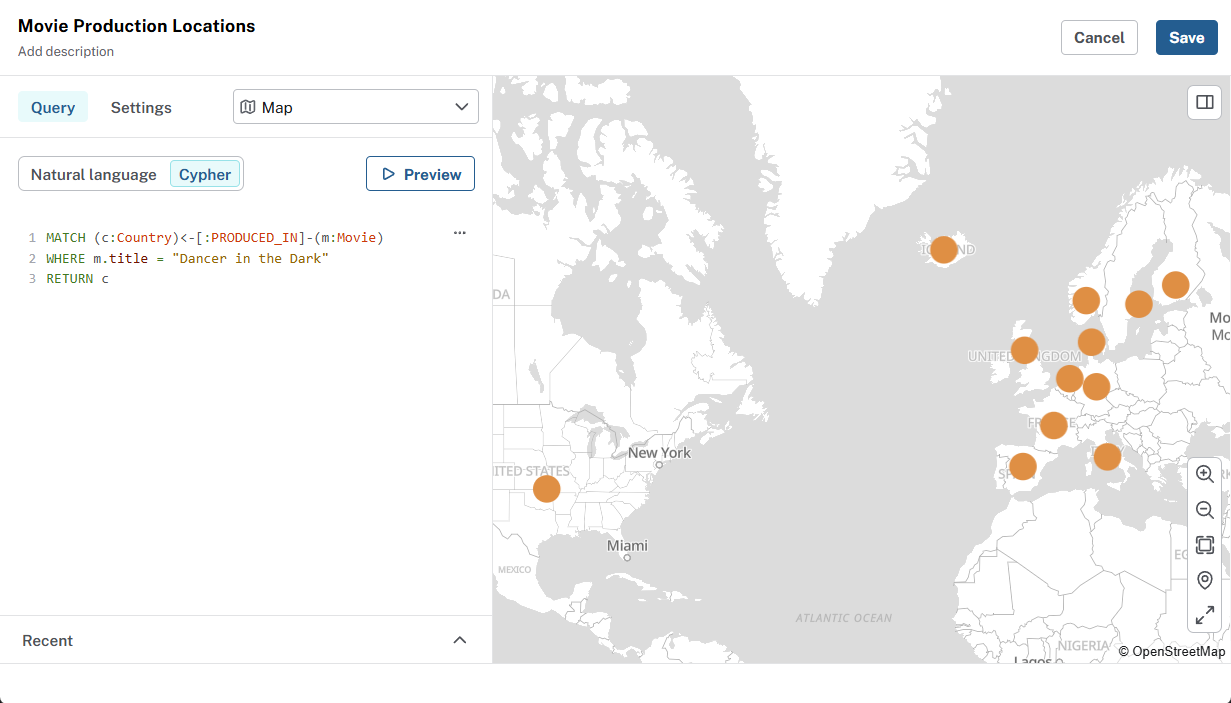
Resolving coordinates
Dashboards resolve positions in this order on each node:
-
A property of type
Point(WGS 84), or -
Paired
latitudeandlongitudeproperties, or -
Paired
latandlongproperties.
Add a filter to the Map
The title of the movie is hardcoded in the query above.
To make the map more interactive, add a filter that lets user choose which movie production countries to see on the map.
Summary
You added countries and coordinates to dataset and created a Map card to visualize where movies were produced. You also added a filter to make the map interactive.